





€19.00

|
This item has been sold |
| 2 | |
| times |
GBA SP Screen Kit (IPS)

The RetroSix CleanScreen Kit (Laminated IPS) for the Game Boy Advance SP is the most refined display upgrade for Nintendo's iconic clamshell handheld – zero ghosting, zero tearing, zero flickering, with vivid colours and true-to-original image reproduction.
- Fully laminated IPS display – no dust or smudges between glass and panel
- Identical pixel size to the original GBA SP screen
- OSD menu with brightness, colour modes, scanlines, pixel grid & True Motion
- Ultra-low-power driver board – lowest power draw of any IPS kit on the market
- No soldering required for the basic installation
RetroSix CleanScreen Kit (Laminated IPS) for Game Boy Advance SP
You know the drill: the original GBA SP screen was never a showstopper – early models lacked a backlight, contrast was mediocre, and many displays are simply dying by now. So you go for an IPS mod – sounds easy, right? Unfortunately, most IPS kits on the market bring their own set of issues: oversaturated colours, ghosting, tearing, backlight bleed, oversized panels, or missing transparency support that causes annoying flickering in games like Pokémon or Metroid. RetroSix analysed all of this and engineered a solution from the ground up – the result is the CleanScreen.
What makes the Laminated version special?
In the laminated version, the protective glass is industrially bonded directly to the IPS panel. That means: no dust between glass and display, no visible smudges, a richer look – and installation is even easier since you handle glass and screen as a single unit. The trade-off: the display is more susceptible to drops on hard surfaces, and you will need a compatible (laminated) shell. With an original GBA SP shell, you will need to trim some plastic from the inside of the top lid – with RetroSix's own shells, no cutting is required at all.
Technical Highlights
- Identical screen size – absolutely pixel-perfect match to the original GBA SP display, no oversized panel
- Zero lag / zero ghosting / zero tearing / zero flickering / zero light bleed
- True Motion – transparency support so games with transparency effects (e.g. Pokémon, Zelda) run without flickering
- OSD menu (On-Screen Display) for: infinitely adjustable brightness, scanline & pixel grid emulation, colour modes (True Color / IPS / Grey / DMG), screen position adjustment
- True Color – calibrated to match the colour reproduction of the coveted AGS-101 display, the most popular GBA SP model
- Ultra-low-power driver – the CleanScreen draws approx. 40 mA less than competing IPS screens on the market (your battery will thank you)
Installation & What's in the Box
Basic installation requires no soldering – simply remove the old screen, insert the CleanScreen and connect it. Optionally (but highly recommended): solder the included button ribbon onto the board pads (no wires, just pads) to access the full OSD menu via buttons. The whole install can be done in a matter of minutes.
Important: Always test the screen before installation (dry run)! The display is fragile – once installed and damaged, the warranty is void. No adhesives, no frames, no soldering before the first test.
What's Included
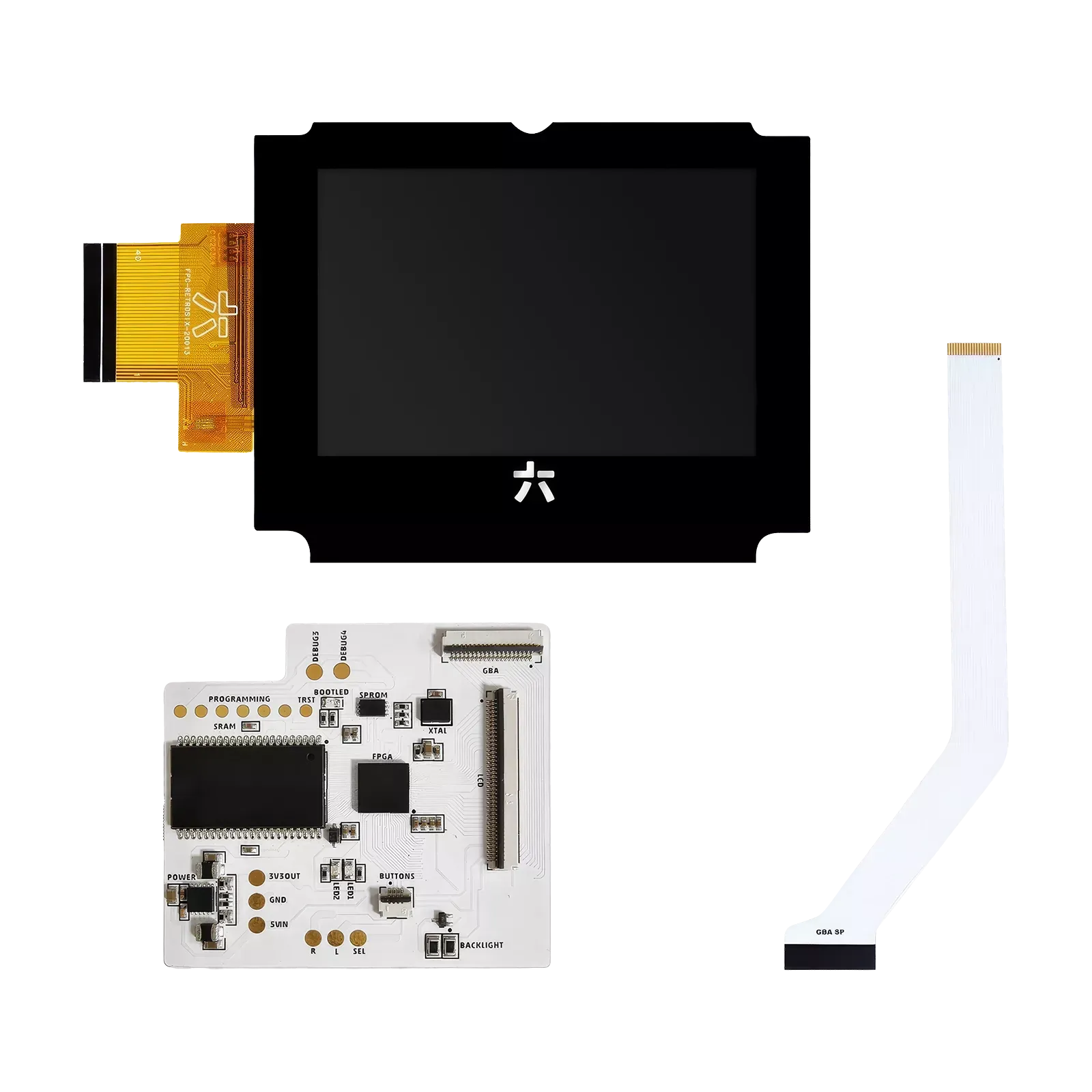
- GBA SP CleanScreen PCB (driver board)
- GBA SP CleanScreen IPS Laminated Screen (laminated display)
- GBA SP LCD Ribbon
- GBA SP CleanScreen Button Ribbon
Compatibility & Notes
- Exclusively for the Game Boy Advance SP
- Laminated display requires a compatible laminated shell
- When using original shells: light trimming of plastic inside the top lid is required
- Install guides available at: retrosix.wiki & youtube.com/retrosix
- System
- Game Boy Advance
- Brand compatibility
- Nintendo
chat
Comments (0)


Everdrive GBA X5 Mini
Out-of-Stock
€125.00

RetroTINK-4k Pro
In Stock
€899.00
Toad Soft PVC Keychain
In Stock
€9.00