



|
This item has been sold |
| 147 | |
| times |


Brawler64 Bluetooth NSO Edition

The Brawler64 Bluetooth NSO Edition brings next-gen wireless N64 gaming to your Nintendo Switch with seamless compatibility and modern features.
- Wireless Bluetooth connectivity for Nintendo Switch Online and Switch – no dongles needed
- Quick-swap button to switch between NSO N64 and Pro Controller layouts instantly
- Motion sensor and dual vibration feedback for immersive gameplay
- 10+ hours battery life with 30+ feet wireless range
- Compatible with other Bluetooth-enabled devices
- Includes Screenshot, Home, and minus buttons for full Switch functionality
Your favorite N64 games deserve a controller that bridges retro nostalgia with modern wireless performance!
We're excited to bring you the latest evolution of the legendary Brawler64 controller – the Brawler64 Bluetooth NSO Edition. This next-generation wireless controller is specifically designed for Nintendo Switch Online's N64 library, giving you the authentic feel of classic N64 gaming with all the convenience and features you expect from modern hardware.
Seamless Nintendo Switch Integration
What makes this controller truly special is its dual personality. With the innovative "Swap" button, you can instantly switch between the NSO N64 button layout and the traditional Switch Pro controller layout. That means you only need one controller to enjoy both your retro N64 favorites and modern Switch titles – no more juggling multiple controllers or dealing with complicated remapping. New Screenshot, Home, and minus buttons have been added to ensure you have full access to all Switch functions right at your fingertips.
Connection couldn't be easier: just pair your Brawler64 NSO Edition with your Switch via Bluetooth and you're ready to play. No firmware updates, no dongles, no hassle – just pure gaming fun from the moment you open the box.
Feel Every Moment with Modern Features
This isn't just a retro controller remake – it's a complete enhancement of the N64 experience. The built-in motion sensor opens up new gameplay possibilities, while dual vibration feedback lets you feel every rumble, explosion, and impact in your favorite N64 classics. Finally experience the RUMBLE the way it was meant to be!
Thanks to the latest Bluetooth technology with ultra-low latency, you'll enjoy responsive, lag-free gaming whether you're sitting on your couch or across the room. With a wireless range of over 30 feet and an impressive 10+ hours of battery life per charge, you can game all day (and night) without interruption. The rechargeable battery means you're always ready for your next gaming session.
Beyond the Switch
While it's optimized for Nintendo Switch, the Brawler64 NSO Edition works beautifully with any Bluetooth-capable device. Whether you want to use it with your PC for emulation, connect it to your smartphone, or pair it with another compatible system, this versatile controller has you covered.
The Brawler64 Bluetooth NSO Edition combines everything you loved about the original N64 controller with the wireless freedom and modern features you need today. It's the perfect companion for reliving your favorite childhood gaming memories or discovering N64 classics for the first time on Nintendo Switch Online.

- System
- Nintendo Switch
Windows PC - Controller type
- Gamepad
- Battery category
- Secondary, 1-50g
- WEEE registration number
- 23582226
- Battery weight (g)
- 40
- Connection type
- Bluetooth
Wired - Number of analog sticks
- 1
- Connection compatibility
- Bluetooth
Wired USB - Stick technology
- Standard
- Controller layout
- N64-style gamepad
- Motion control
- Yes
- Vibration
- Yes
- Input modes (Bluetooth)
- DInput
Switch mode
XInput - Input mode switching
- Bluetooth: Switch Pro/NSO mode; hold B+Pair to enter XInput for PC/Android. DInput is the default mode before switching. SWAP changes the N64/Switch button layout, not the input protocol. PC also works over USB-C.
DRAGONBOX KNOW-HOW
Practical answers about compatibility, features and how things work.
What input modes are available: XInput, DInput, Switch and PlayStation?
XInput is the best choice for most PC gamers. This widely supported input mode follows the Xbox controller layout and is recognized directly by many modern Windows games. For most users, that is all they need. However, XInput support does not automatically mean a controller works on a real Xbox console.
DInput (DirectInput) is the older Windows standard. Some older PC games, such as Crimson Skies or Need for Speed: Underground 2, support DirectInput but not native XInput.
An additional DInput or generic USB HID mode can also be useful for retro gaming systems, FPGA devices, emulators and other specialized setups. Some devices support Xbox-compatible controllers, while others expect a standard USB HID gamepad. Which input modes work depends on the specific device and its software.
For example, MiSTer FPGA supports many USB controllers as well as Xbox-compatible input devices. Depending on the core, different button mappings or special input features may be required. DInput itself is therefore not a general requirement on MiSTer.
If you plan to use your controller with retro or FPGA systems, check which input modes are supported beforehand. A controller with several selectable modes offers more flexibility.
Switch mode makes the controller appear to compatible devices as a Nintendo Switch Pro Controller. It can be useful beyond the Switch: Steam Input, Linux and various applications can also support these controllers. However, not every PC game will recognize this mode automatically.
PlayStation mode can refer to different compatibility modes depending on the controller, such as PS4 controller or PlayStation Classic modes. There is no single universal PlayStation mode. Compatibility with a particular PlayStation console must be explicitly confirmed for the product.
Connection type matters: Not every input mode is available over every connection. Some controllers support DInput only via a USB cable, while others also offer it through a 2.4 GHz receiver or Bluetooth.
That is why our technical specifications list confirmed input modes separately for USB, 2.4 GHz and Bluetooth.
What is the difference between 2.4 GHz wireless and Bluetooth controllers?
Both types of connection are wireless and use the 2.4 GHz frequency band. The difference is the transmission technology: Bluetooth is a widely used standard, whereas “2.4 GHz wireless” usually refers to a manufacturer's own radio link with a matching receiver.
Bluetooth: flexible and widely compatible
Many PCs, gaming handhelds, smartphones, tablets and consoles support Bluetooth controllers. If the controller is compatible with the device, you usually pair it once through the Bluetooth settings. After that, it will normally reconnect automatically.
No additional receiver is needed, leaving a USB port free.
However, not every Bluetooth-enabled device supports every Bluetooth controller. Game consoles in particular may require certain controller models or input modes.
2.4 GHz wireless: plug in and play
Controllers using 2.4 GHz wireless usually come with a matching USB receiver (dongle). Plug it in and switch the controller on. The two are often paired already.
This offers several advantages:
- No Bluetooth menu or Bluetooth manager setup is needed.
- It also works with compatible devices that have no built-in Bluetooth.
- Many systems recognize the receiver as a regular USB controller.
- That can be particularly useful for PCs, retro systems and other devices with USB ports.
The device must still support the particular receiver and its input mode. Not every dongle automatically works with every system. Some retro controllers also use dedicated receivers for particular consoles.
What about speed?
Many 2.4 GHz controllers offer high polling rates and low, consistent latency. Modern Bluetooth controllers can also be very fast, however. Actual performance depends on the specific controller and connection.
Which connection should I choose?
Bluetooth is especially useful if you want to use a controller with different compatible devices without carrying an extra receiver.
2.4 GHz wireless is often a good choice if you want a straightforward setup, prefer a responsive connection, or use a device without Bluetooth.
Check the product's technical specifications to see which connections and systems it supports.
What do polling rate and latency mean for a controller?
Polling rate and latency both affect how quickly a controller responds to your inputs, but they describe two different things.
What is polling rate?
Polling rate describes how often the controller or its connection reports or requests new input data from the system.
It is measured in hertz (Hz).
| Polling rate | Reporting interval |
|---|---|
| 125 Hz | 8 milliseconds |
| 250 Hz | 4 milliseconds |
| 500 Hz | 2 milliseconds |
| 1,000 Hz | 1 millisecond |
The higher the polling rate, the shorter the interval between input reports can be.
A high polling rate can therefore be useful in fast-paced games. The connected system must also support the relevant reporting rate.
What is latency?
Latency is the delay between an action on the controller and the moment the system registers that input.
Several factors contribute to this delay:
- How quickly the controller detects and processes the button press.
- How long transmission via cable, Bluetooth or 2.4 GHz wireless takes.
- How quickly the connected system processes the input.
Before the action becomes visible on the screen, the game and display introduce additional processing delays.
Does a 1,000 Hz polling rate automatically mean 1 ms of latency?
No. At 1,000 Hz, only the reporting interval is one millisecond. The total input delay can be considerably higher.
In practice, a well-optimized controller running at 500 Hz can therefore respond faster than a poorly optimized controller running at 1,000 Hz.
Which values matter?
For most games, consistently low latency matters more than the highest possible polling rate.
Low delays can be especially beneficial for fast action games, shooters and competitive games. In retro games, processing by emulators, consoles or FPGA systems and the display also matter.
Our tip: A high polling rate is an interesting technical specification, but does not by itself prove that a controller is fast. Measurements of real-world latency under comparable conditions are more meaningful.
Manufacturer
Retro Fighters
+844 3020902
21818 Lassen St Ste A
Suite A
91311 Chatsworth, CA
United States
EU responsible person
OpenPandora GmbH
+49 841 1317733
Asternweg 5
Michael Mrozek
85080 Gaimersheim
Germany
You might also like




chat
Comments (0)


8BitDo SN30 Pro Bluetooth Hall Gamepad (Switch, PC, macOS, Android)
Out-of-Stock
The 8BitDo SN30 Pro combines classic SNES design with modern gaming technology, featuring Hall Effect analog sticks for ultimate precision.
Premium Hall Effect sticks for drift-free accuracy
Classic SNES-inspired design with full modern controls
Multi-platform compatibility: Windows, Switch, Android & more
Wireless Bluetooth or wired USB-C connection
Built-in rumble and motion controls
Rechargeable battery with USB-C charging
Premium Hall Effect sticks for drift-free accuracy
Classic SNES-inspired design with full modern controls
Multi-platform compatibility: Windows, Switch, Android & more
Wireless Bluetooth or wired USB-C connection
Built-in rumble and motion controls
Rechargeable battery with USB-C charging
€39.00
€42.00


Anbernic RG557 (256GB, Android 14) incl. Carry Case
Out-of-Stock
Android handheld designed for more demanding emulation and modern retro gaming features.
5.48" AMOLED display (1920×1080, 16:9)
Android 14
High-end emulation performance: PS2 runs very well and GameCube is generally solid, depending on the emulator and game.
Official carrying case included
5.48" AMOLED display (1920×1080, 16:9)
Android 14
High-end emulation performance: PS2 runs very well and GameCube is generally solid, depending on the emulator and game.
Official carrying case included
€299.00
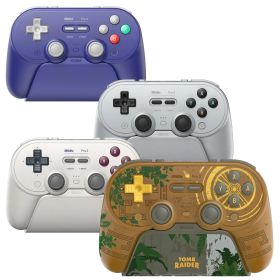
8BitDo Pro 3 Controller (Switch, PC, Steam Deck, Android, iOS, macOS)
In Stock
The 8BitDo Pro 3 combines retro design with cutting-edge features for the ultimate wireless gaming experience across multiple platforms.
Three connection modes: Bluetooth, 2.4G wireless adapter, and wired USB for maximum compatibility
Premium TMR joysticks and Hall Effect triggers for drift-free precision and durability
Unique swappable magnetic ABXY buttons let you physically rearrange your button layout
Compatible with Switch 1 & 2, Windows PC, Apple devices, SteamOS, and Android
Includes charging dock, 2.4G adapter, ball-top joystick caps, and button puller tool
Pro back paddle buttons (L4/R4) and 1000mAh rechargeable battery for extended gaming sessions
Three connection modes: Bluetooth, 2.4G wireless adapter, and wired USB for maximum compatibility
Premium TMR joysticks and Hall Effect triggers for drift-free precision and durability
Unique swappable magnetic ABXY buttons let you physically rearrange your button layout
Compatible with Switch 1 & 2, Windows PC, Apple devices, SteamOS, and Android
Includes charging dock, 2.4G adapter, ball-top joystick caps, and button puller tool
Pro back paddle buttons (L4/R4) and 1000mAh rechargeable battery for extended gaming sessions
€64.90


Bowser Soft PVC Keychain
In Stock
Let the Koopa King protect your keys with this officially licensed Bowser keychain crafted from soft, flexible PVC material.
Officially licensed Super Mario merchandise
Classic Bowser design with iconic spiky shell and horns
Made from durable soft PVC for long-lasting use
Compact size perfect for everyday carry
Ideal gift for Mario and retro gaming fans
Authentic Nintendo collectible accessory
Officially licensed Super Mario merchandise
Classic Bowser design with iconic spiky shell and horns
Made from durable soft PVC for long-lasting use
Compact size perfect for everyday carry
Ideal gift for Mario and retro gaming fans
Authentic Nintendo collectible accessory
€9.00

HighSpeed Mini-HDMI to HDMI Cable (1m)
In Stock
The perfect cable for your RetroGEM PixelFX mod: slim Mini-HDMI to HDMI cable (Type C to Type A), 1 metre long, High Speed with Ethernet – supports up to 4K resolution.Connects the Mini-HDMI output (Type C) of your modded console directly to the standard HDMI input on your TV or monitor.Carries the full signal of your RetroGEM PixelFX – from Full HD all the way up to 4K.The Ultra Slim design is noticeably thinner than standard HDMI cables and sits flush against the console shell.1 metre length – ideal for typical retro setups, no cable mess behind the TV.
€5.00
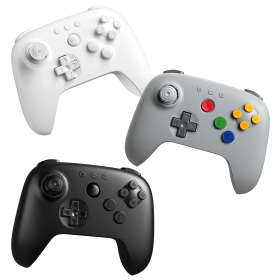
8BitDo 64 Bluetooth Controller (Analogue 3D, Switch, PC, Android)
In Stock
The 8BitDo 64 Bluetooth Controller brings the iconic N64 layout into the modern era: Bluetooth, Hall Effect stick, and USB-C charging – everything the original was missing.
Bluetooth for Nintendo Switch, Switch 2, Android & Windows
Hall Effect analog stick – no stick drift
Classic N64 button layout (A, B + 4 yellow C-buttons, L/R/Z)
Built-in rumble, button remapping & turbo function
Charges via USB-C
Bluetooth for Nintendo Switch, Switch 2, Android & Windows
Hall Effect analog stick – no stick drift
Classic N64 button layout (A, B + 4 yellow C-buttons, L/R/Z)
Built-in rumble, button remapping & turbo function
Charges via USB-C
€34.50
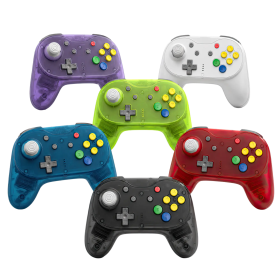
Brawler64 Pro
In Stock
The Brawler64 Pro Series by Retro Fighters is the most advanced N64 controller yet – wireless, with a drift-resistant Hall Effect stick and compatible with N64, Switch, Switch 2, and PC.
Hall Effect analog stick with 8-way notched gate – no drift, no wear
2.4GHz wireless + wired USB mode with 1000Hz polling rate
Programmable back buttons & adjustable rumble
Compatible with N64, Nintendo Switch, Switch 2, PC, Steam Deck & MiSTer FPGA
Magnetic faceplate system for instant color swaps
Includes: controller, N64 Retro Receiver, USB Receiver, braided USB-C cable, quick start manual
Hall Effect analog stick with 8-way notched gate – no drift, no wear
2.4GHz wireless + wired USB mode with 1000Hz polling rate
Programmable back buttons & adjustable rumble
Compatible with N64, Nintendo Switch, Switch 2, PC, Steam Deck & MiSTer FPGA
Magnetic faceplate system for instant color swaps
Includes: controller, N64 Retro Receiver, USB Receiver, braided USB-C cable, quick start manual
€69.00

Defender Pro (PSX / PS2 / PS3 / PC / Switch)
In Stock
The Defender Pro by Retro Fighters is your ultimate wireless gaming controller for PlayStation 1, 2, 3, PC, and Nintendo Switch—packed with modern features for retro and current-gen gaming.
Hall Effect analog sticks eliminate stick drift for precise control
Dual wireless modes: 2.4GHz and Bluetooth with 30+ foot range
Programmable back grip buttons and pressure-sensitive face buttons
1000Hz polling rate for ultra-low latency performance
Switch between analog and digital trigger modes on the fly
Complete package with PS1/2 receiver, USB receiver, and braided USB-C cable
Hall Effect analog sticks eliminate stick drift for precise control
Dual wireless modes: 2.4GHz and Bluetooth with 30+ foot range
Programmable back grip buttons and pressure-sensitive face buttons
1000Hz polling rate for ultra-low latency performance
Switch between analog and digital trigger modes on the fly
Complete package with PS1/2 receiver, USB receiver, and braided USB-C cable
€72.00

Hunter360 Controller (XBox360)
In Stock
Experience gaming perfection with the Retro Fighters Hunter 360 Wireless Controller – where classic Xbox 360 design meets cutting-edge technology!
Hall Effect analog sticks guarantee zero drift and ultimate precision
Ultra-responsive 1000Hz polling rate for pro-level performance
Reliable 2.4GHz wireless with 30+ feet range and 10+ hour battery life
Compatible with Xbox 360, PC, Steam, and Android devices
USB-C charging and customizable rumble intensity
Hall Effect analog sticks guarantee zero drift and ultimate precision
Ultra-responsive 1000Hz polling rate for pro-level performance
Reliable 2.4GHz wireless with 30+ feet range and 10+ hour battery life
Compatible with Xbox 360, PC, Steam, and Android devices
USB-C charging and customizable rumble intensity
€69.00

D6 Dreamcast Controller (Dreamcast / Switch / PC)
In Stock
The Retro Fighters D6 brings wireless freedom to your Dreamcast, Switch, and PC gaming with precision controls and authentic 6-button layout.Wireless 2.4 GHz connection with dedicated receivers for Dreamcast and USB devicesPremium Kailh® microswitches in D-pad and face buttons for fighting game precisionSwitchable control modes and C/Z or L/R button mapping for maximum compatibilityVMU slot supports original VMUs and modern alternatives like 8BITMODS VMU Pro®Built-in rumble motors and 10+ hour rechargeable battery for extended gaming sessions
€59.00

BattlerGC Pro Wireless Controller (GameCube)
In Stock
The BattlerGC Pro Wireless Controller brings GameCube perfection to modern gaming with dual wireless technology and professional-grade components.
Dual wireless: 2.4 GHz & Bluetooth for GameCube, Wii, Switch & PC
Hall Effect sensors eliminate stick drift forever
Premium Kailh® switches and authentic GC-style analog triggers
10+ hours battery life with wireless vibration feedback
Ergonomic design with dual Z buttons and programmable back buttons
Dual wireless: 2.4 GHz & Bluetooth for GameCube, Wii, Switch & PC
Hall Effect sensors eliminate stick drift forever
Premium Kailh® switches and authentic GC-style analog triggers
10+ hours battery life with wireless vibration feedback
Ergonomic design with dual Z buttons and programmable back buttons
€69.00

Mantis Wireless Mini Bluetooth Controller (PS4 / PC)
In Stock
The Mantis Wireless Mini Bluetooth Controller brings pro-level features to your PS4 and PC gaming in a compact, ergonomic design.Hall Effect technology in analog sticks and triggers eliminates stick drift permanentlyTwo programmable back buttons plus adjustable trigger stops for competitive playFull PS4 functionality with touchpad, LED light bar, gyroscope, and vibrationComfortable mini design with textured grips and precise D-padXInput and DInput modes switchable on the fly for maximum compatibility
€47.00

Brawler64 Bluetooth NSO Limited Gold Edition
Last items in stock
Experience authentic N64 gaming on your Nintendo Switch with this premium wireless controller in stunning limited Gold Edition.Full Nintendo Switch Online compatibility with instant "Swap" button for seamless layout switchingAdvanced Bluetooth connectivity with 30+ feet range and ultra-low latencyMotion sensor and dual vibration feedback for immersive gameplayImpressive 10+ hours battery life per chargeNo dongles, remapping or firmware updates required - just connect and playWorks with other Bluetooth-enabled devices too
€59.00
Defender Bluetooth Edition (PS3/PS4)
In Stock
The Defender Bluetooth Edition brings retro vibes and modern wireless tech to your PS3, PS4, and PC gaming sessions!True wireless Bluetooth connection - no dongle requiredFull SixAxis motion control and pressure-sensitive buttonsTurbo functionality for competitive edgeVibration feedback and ergonomic design30+ feet wireless range with rechargeable batteryUSB-C charging cable included
€59.00
Hunter XBOX® Wireless gamepad
In Stock
Experience next-generation gaming with the Hunter XBOX® Wireless gamepad – featuring revolutionary Hall Effect technology for drift-free precision across original XBOX, Switch, and PC platforms.
Hall Effect analog sticks and triggers guarantee zero drift, ever
2.4 GHz wireless technology with 10+ hour rechargeable battery
Compatible with original XBOX®, Nintendo Switch® and Windows PC
Wireless rumble, pressure-sensitive buttons, and ergonomic design
Premium textured grips and precise D-pad for ultimate control
Easy sync and setup with low-latency wireless connection
Hall Effect analog sticks and triggers guarantee zero drift, ever
2.4 GHz wireless technology with 10+ hour rechargeable battery
Compatible with original XBOX®, Nintendo Switch® and Windows PC
Wireless rumble, pressure-sensitive buttons, and ergonomic design
Premium textured grips and precise D-pad for ultimate control
Easy sync and setup with low-latency wireless connection
€55.00
BattlerGC Wireless Controller (GameCube, Switch, PC)
Last items in stock
The BattlerGC brings wireless freedom to your GameCube, Switch and PC gaming with ergonomic design and premium features.Wireless controller for GameCube, Switch, PC, Wii and Wii U compatibility2.4GHz wireless technology with 9-meter range and 10+ hours battery lifePressure-sensitive analog triggers and dual Z shoulder buttons for precise controlErgonomic layout with top-left analog stick placement, perfect for Smash BrosUSB-C rechargeable battery and wireless vibration feedback included
€49.00
Defender 2.4G (PSX / PS2)
In Stock
The Defender 2.4G brings wireless freedom to your retro PlayStation collection and modern systems alike.
2.4GHz wireless technology with over 9m range for lag-free gaming
Pressure-sensitive buttons preserve authentic PlayStation gameplay
Turbo functionality and vibration feedback for enhanced control
Compatible with PS1, PS2, PS3, PS Classic, Nintendo Switch and PC
Includes USB receiver, PS1/PS2 receiver and charging cable
2.4GHz wireless technology with over 9m range for lag-free gaming
Pressure-sensitive buttons preserve authentic PlayStation gameplay
Turbo functionality and vibration feedback for enhanced control
Compatible with PS1, PS2, PS3, PS Classic, Nintendo Switch and PC
Includes USB receiver, PS1/PS2 receiver and charging cable
€45.00
Duelist (Nintendo Switch)
In Stock
The Retro Fighters Duelist brings GameCube-style button layout to your Nintendo Switch with modern wireless technology, designed specifically for Super Smash Bros. Ultimate players.GameCube-inspired design with Pro Controller ergonomics for maximum comfort during intense matchesExclusive features for Smash Bros. Ultimate including enlarged "A" button and innovative "S" button for easy Smash and Short Hop attacksWireless Bluetooth connectivity with 9m range, LED indicator, and rechargeable battery for untethered gameplayDual "Z" triggers and Mode Attack button for quick switching between attack stylesComplete package includes controller, manual, and USB-C charging cable
€45.00
Brawler64 Pro
In Stock
The Brawler64 Pro Series by Retro Fighters is the most advanced N64 controller yet – wireless, with a drift-resistant Hall Effect stick and compatible with N64, Switch, Switch 2, and PC.
Hall Effect analog stick with 8-way notched gate – no drift, no wear
2.4GHz wireless + wired USB mode with 1000Hz polling rate
Programmable back buttons & adjustable rumble
Compatible with N64, Nintendo Switch, Switch 2, PC, Steam Deck & MiSTer FPGA
Magnetic faceplate system for instant color swaps
Includes: controller, N64 Retro Receiver, USB Receiver, braided USB-C cable, quick start manual
Hall Effect analog stick with 8-way notched gate – no drift, no wear
2.4GHz wireless + wired USB mode with 1000Hz polling rate
Programmable back buttons & adjustable rumble
Compatible with N64, Nintendo Switch, Switch 2, PC, Steam Deck & MiSTer FPGA
Magnetic faceplate system for instant color swaps
Includes: controller, N64 Retro Receiver, USB Receiver, braided USB-C cable, quick start manual
€69.00
Defender Pro (PSX / PS2 / PS3 / PC / Switch)
In Stock
The Defender Pro by Retro Fighters is your ultimate wireless gaming controller for PlayStation 1, 2, 3, PC, and Nintendo Switch—packed with modern features for retro and current-gen gaming.
Hall Effect analog sticks eliminate stick drift for precise control
Dual wireless modes: 2.4GHz and Bluetooth with 30+ foot range
Programmable back grip buttons and pressure-sensitive face buttons
1000Hz polling rate for ultra-low latency performance
Switch between analog and digital trigger modes on the fly
Complete package with PS1/2 receiver, USB receiver, and braided USB-C cable
Hall Effect analog sticks eliminate stick drift for precise control
Dual wireless modes: 2.4GHz and Bluetooth with 30+ foot range
Programmable back grip buttons and pressure-sensitive face buttons
1000Hz polling rate for ultra-low latency performance
Switch between analog and digital trigger modes on the fly
Complete package with PS1/2 receiver, USB receiver, and braided USB-C cable
€72.00
Hunter360 Controller (XBox360)
In Stock
Experience gaming perfection with the Retro Fighters Hunter 360 Wireless Controller – where classic Xbox 360 design meets cutting-edge technology!
Hall Effect analog sticks guarantee zero drift and ultimate precision
Ultra-responsive 1000Hz polling rate for pro-level performance
Reliable 2.4GHz wireless with 30+ feet range and 10+ hour battery life
Compatible with Xbox 360, PC, Steam, and Android devices
USB-C charging and customizable rumble intensity
Hall Effect analog sticks guarantee zero drift and ultimate precision
Ultra-responsive 1000Hz polling rate for pro-level performance
Reliable 2.4GHz wireless with 30+ feet range and 10+ hour battery life
Compatible with Xbox 360, PC, Steam, and Android devices
USB-C charging and customizable rumble intensity
€69.00
D6 Dreamcast Controller (Dreamcast / Switch / PC)
In Stock
The Retro Fighters D6 brings wireless freedom to your Dreamcast, Switch, and PC gaming with precision controls and authentic 6-button layout.Wireless 2.4 GHz connection with dedicated receivers for Dreamcast and USB devicesPremium Kailh® microswitches in D-pad and face buttons for fighting game precisionSwitchable control modes and C/Z or L/R button mapping for maximum compatibilityVMU slot supports original VMUs and modern alternatives like 8BITMODS VMU Pro®Built-in rumble motors and 10+ hour rechargeable battery for extended gaming sessions
€59.00
BattlerGC Pro Wireless Controller (GameCube)
In Stock
The BattlerGC Pro Wireless Controller brings GameCube perfection to modern gaming with dual wireless technology and professional-grade components.
Dual wireless: 2.4 GHz & Bluetooth for GameCube, Wii, Switch & PC
Hall Effect sensors eliminate stick drift forever
Premium Kailh® switches and authentic GC-style analog triggers
10+ hours battery life with wireless vibration feedback
Ergonomic design with dual Z buttons and programmable back buttons
Dual wireless: 2.4 GHz & Bluetooth for GameCube, Wii, Switch & PC
Hall Effect sensors eliminate stick drift forever
Premium Kailh® switches and authentic GC-style analog triggers
10+ hours battery life with wireless vibration feedback
Ergonomic design with dual Z buttons and programmable back buttons
€69.00
Mantis Wireless Mini Bluetooth Controller (PS4 / PC)
In Stock
The Mantis Wireless Mini Bluetooth Controller brings pro-level features to your PS4 and PC gaming in a compact, ergonomic design.Hall Effect technology in analog sticks and triggers eliminates stick drift permanentlyTwo programmable back buttons plus adjustable trigger stops for competitive playFull PS4 functionality with touchpad, LED light bar, gyroscope, and vibrationComfortable mini design with textured grips and precise D-padXInput and DInput modes switchable on the fly for maximum compatibility
€47.00

Retro85 Mini NES Cartridge Switch Game Cases
In Stock
Store your Nintendo Switch games in adorable mini NES cartridge cases that blend 1985 nostalgia with modern protection!Set of 8 miniature NES-styled cases for Switch game cardsAuthentic 1985 NES cartridge design in compact sizeIncludes transparent hard case to safely store all 8 cartridgesProtects your Switch games from scratches, dust and damagePerfect for collectors and display enthusiastsGreat gift for retro gaming fans and Nintendo lovers
€18.00
Brawler64 Bluetooth NSO Limited Gold Edition
Last items in stock
Experience authentic N64 gaming on your Nintendo Switch with this premium wireless controller in stunning limited Gold Edition.Full Nintendo Switch Online compatibility with instant "Swap" button for seamless layout switchingAdvanced Bluetooth connectivity with 30+ feet range and ultra-low latencyMotion sensor and dual vibration feedback for immersive gameplayImpressive 10+ hours battery life per chargeNo dongles, remapping or firmware updates required - just connect and playWorks with other Bluetooth-enabled devices too
€59.00
Defender Bluetooth Edition (PS3/PS4)
In Stock
The Defender Bluetooth Edition brings retro vibes and modern wireless tech to your PS3, PS4, and PC gaming sessions!True wireless Bluetooth connection - no dongle requiredFull SixAxis motion control and pressure-sensitive buttonsTurbo functionality for competitive edgeVibration feedback and ergonomic design30+ feet wireless range with rechargeable batteryUSB-C charging cable included
€59.00
Hunter XBOX® Wireless gamepad
In Stock
Experience next-generation gaming with the Hunter XBOX® Wireless gamepad – featuring revolutionary Hall Effect technology for drift-free precision across original XBOX, Switch, and PC platforms.
Hall Effect analog sticks and triggers guarantee zero drift, ever
2.4 GHz wireless technology with 10+ hour rechargeable battery
Compatible with original XBOX®, Nintendo Switch® and Windows PC
Wireless rumble, pressure-sensitive buttons, and ergonomic design
Premium textured grips and precise D-pad for ultimate control
Easy sync and setup with low-latency wireless connection
Hall Effect analog sticks and triggers guarantee zero drift, ever
2.4 GHz wireless technology with 10+ hour rechargeable battery
Compatible with original XBOX®, Nintendo Switch® and Windows PC
Wireless rumble, pressure-sensitive buttons, and ergonomic design
Premium textured grips and precise D-pad for ultimate control
Easy sync and setup with low-latency wireless connection
€55.00
BattlerGC Wireless Controller (GameCube, Switch, PC)
Last items in stock
The BattlerGC brings wireless freedom to your GameCube, Switch and PC gaming with ergonomic design and premium features.Wireless controller for GameCube, Switch, PC, Wii and Wii U compatibility2.4GHz wireless technology with 9-meter range and 10+ hours battery lifePressure-sensitive analog triggers and dual Z shoulder buttons for precise controlErgonomic layout with top-left analog stick placement, perfect for Smash BrosUSB-C rechargeable battery and wireless vibration feedback included
€49.00
Defender 2.4G (PSX / PS2)
In Stock
The Defender 2.4G brings wireless freedom to your retro PlayStation collection and modern systems alike.
2.4GHz wireless technology with over 9m range for lag-free gaming
Pressure-sensitive buttons preserve authentic PlayStation gameplay
Turbo functionality and vibration feedback for enhanced control
Compatible with PS1, PS2, PS3, PS Classic, Nintendo Switch and PC
Includes USB receiver, PS1/PS2 receiver and charging cable
2.4GHz wireless technology with over 9m range for lag-free gaming
Pressure-sensitive buttons preserve authentic PlayStation gameplay
Turbo functionality and vibration feedback for enhanced control
Compatible with PS1, PS2, PS3, PS Classic, Nintendo Switch and PC
Includes USB receiver, PS1/PS2 receiver and charging cable
€45.00