




|
This item has been sold |
| 18 | |
| times |


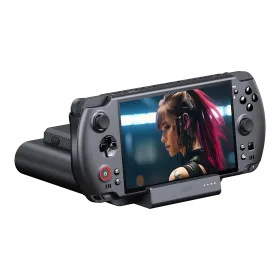
GPD Win 5

Is this still a handheld? In terms of performance, the GPD Win 5 is more like a desktop PC! Take your favourite PC games with you wherever you go!
Outstanding computing power
With the GPD Win 5, you have plenty of power. The brand new AMD Ryzen™ Al Max+ 395 (and AMD Ryzen™ Al Max 385) ensure that even the latest titles can be played on the go! With an integrated AMD Radeon 8060S (or 8050S in the case of the Max 385), it sets new standards in the mobile sector.
Just to be clear: The handheld alone achieves roughly the same performance as the GPD Win 4 (2024) in combination with the GPD G1 eGPU - and that's with only around 28W TDP.
And the GPD Win 5 can be boosted up to 75W TDP - so you can imagine what's possible here.
This makes the GPD Win 5 probably the most powerful handheld ever.
Efficient cooling / battery system
For such a performance to be possible at all, there must of course be a corresponding cooling system.
GPD has come up with a solution that may seem unusual at first, but which makes perfect sense and offers advantages:
Two fans are built into the device itself to cool the system accordingly.
This means there is no more space for the battery: it is then plugged onto the back of the device externally. It is designed so that it is not in the way when holding the device.
This seems a little strange, but offers several advantages:
- The service life of the battery is extended as it does not get as warm as a built-in one.
- The device also runs without a battery: this means you don't need to wear out the battery when you are playing near a power socket.
- Batteries can be changed during operation (when the device is connected to the power supply). Running out of battery? Plug it in for a few seconds, replace the battery, continue gaming.
- The device does not need to be opened to replace the battery
Further information and differences to the predecessor
The 7" FullHD (1920x1080) display runs at 120Hz, supports AMD FreeSync and has a response time of 6ms.
The 10-point touchscreen is equipped with the 6th generation of Corning Gorilla Glass - making it really robust.
The physical keyboard is no longer present. This has been completely omitted from the GPD Win 5.
As already mentioned, the battery is external, so you can have several batteries and change them at any time.
A docking station is optionally available so that you can also use the small powerhouse as a desktop PC replacement.
Otherwise, everything has remained as we know it from GPD: Robust housing, Hall sticks and triggers, a responsive DPad, wifi, Bluetooth, micro SD card slot, M.2 2280 slot for the internal NVMe.
As the device can draw a lot of power, it has its own built-in power connection port that supports up to 180W.
It can also be operated or charged via USB-C, but this does not allow 180W.
A detailed overview can be found in the technical data.
Included in delivery:
1 × GPD WIN 5
1 × battery (80Wh)
1 × battery cable
1 × mains adapter with cable
1 × warranty card
1 × quick start guide

- Processor
- AMD Ryzen™ Al Max 385
AMD Ryzen™ Al Max+ 395 - Graphics processor
- AMD Radeon 8050S
AMD Radeon 8060S - Display diagonal
- 7
- Display resolution
- 1920 × 1080
- Touchscreen
- Yes
- Ports
- USB-C 3.2 Gen 2
USB4 - Special features
- Fingerprint-Reader
Gaming Controls
Gyroscope
Hall Sensor Analog Sticks (no stick drift) - Device weight (g)
- 590
- Battery category
- Secondary, 251-500g, Li-Ion
- WEEE registration number
- 23582226
- Battery weight (g)
- 350
- Device dimensions (W × H × D)
- 267 × 112 × 24 mm
- Wi-Fi
- Wi-Fi 6E
- Bluetooth
- Bluetooth 5.3
- Memory (GB)
- 32
64 - Memory type
- LPDDR5X
- Memory speed (MT/s)
- 8000
- Panel technology
- LTPS
- Display glass
- Corning Gorilla Glass 6
- Operating system family
- Windows
- Operating system version
- Windows 11
- Multi-touch
- Yes
Practical answers about compatibility, features and how things work.
Are GPD handhelds regular PCs, and can I install Windows, Linux or another operating system?
Yes! GPD WIN, Pocket and MicroPC devices, as well as the GPD BOX, are full PCs powered by AMD or Intel processors. They are not closed game consoles: you can install normal PC software, manage storage and install another suitable operating system.
Windows is preinstalled on many models, but you can also use an x86-64-compatible Linux distribution such as Ubuntu or Fedora. For gaming handhelds, customized Linux systems such as Bazzite are also worth considering. Other PC operating systems are possible in principle if they can boot and support the hardware. You are not locked into Windows.
Important: Being able to install an OS does not guarantee full driver support. Touchscreens, gamepads, fingerprint readers, display rotation, sleep modes, fan control, special keys and external GPUs may require adjustments or may not work fully. Software and game compatibility also varies by OS.
You can replace Windows or set up dual boot on suitable devices. Back up your files and recovery media first. Official Windows recovery images, BIOS updates and drivers are available from the GPD download center. Check the alternative OS project's current device compatibility before installing.
How do I reinstall Windows, and where can I find GPD drivers and BIOS updates?
Just like on a regular PC, you can reinstall Windows on your GPD device. There are two common options:
- Microsoft Windows installation: Install Windows from a USB installer, then add the device-specific drivers.
- GPD recovery image: Use the image specifically intended for your exact model and generation from the official GPD download center. It often already includes the appropriate manufacturer drivers.
After a clean Windows installation, drivers for wireless networking, graphics, touchscreen, audio, gamepad and other special functions may initially be missing. Download the correct driver package before reinstalling whenever possible.
BIOS updates are not ordinary Windows updates. Only use files intended for your exact hardware revision. A failed or interrupted BIOS update can prevent the PC from booting. Keep the power adapter connected and preferably update BIOS or device firmware only if there is a specific reason.
Important: Reinstallation and recovery may erase personal files, games and settings. Back up your data and recovery information first.
What does TDP mean on a GPD PC, and how does it affect performance, noise and battery life?
TDP is an important processor power and thermal design rating. On many GPD devices, the processor power budget can be adjusted through supported settings or software.
More power can improve performance in demanding games and applications, but it usually means more heat, fan noise and energy consumption. Performance does not increase proportionally with wattage: eventually cooling, temperature or other components become the limiting factor.
Less power can be a better choice for older games, emulation or office work, making the device cooler, quieter and often extending battery life.
A useful approach is to choose a sensible frame-rate limit first, then increase the power budget only as much as needed for smooth play. GPD provides control tools for certain models; the GPDTool overview explains performance profiles and fan controls.
Important: Allowed power limits and adjustment methods vary by model. Do not exceed the manufacturer's supported limits. A higher TDP does not automatically make a device faster or better.
Can I run normal PC games, Steam, GOG, Game Pass and emulators on a GPD handheld?
Yes. A GPD WIN handheld is a normal gaming PC in a small form factor. On Windows, you can use the same PC games, software and stores as on a desktop or laptop, including Steam, GOG, Epic Games Store and the Xbox app. Actual game performance depends on the title's requirements and your GPD configuration.
You can also install emulators just as you would on any other PC. Many classic systems work well with modest settings. You need to supply any legally required game files and BIOS files yourself from authorized sources.
On Linux, many PC games work through Steam and, where appropriate, Proton. Not every Windows game is compatible, however: anti-cheat, DRM and some launchers may cause problems. The Windows PC Game Pass experience is not directly transferable to Linux; cloud gaming may be an alternative.
The key difference from a closed console: You are not limited to one store or a fixed game library. On the other hand, you may need to configure games, controls and graphics options just as on any other PC.
Can I upgrade the SSD and RAM in a GPD PC?
That depends on the exact GPD model. Many devices use replaceable M.2 NVMe SSDs, allowing storage upgrades when the drive's size and interface are compatible. Not every M.2 slot supports the same form factor, speed or purpose; in particular, 2230 and 2280 are different sizes.
RAM is different: many compact GPD gaming handhelds use LPDDR memory soldered directly to the motherboard, which cannot be upgraded like ordinary RAM modules. Other GPD PCs may be built differently, so always check your product's actual specifications.
Before replacing an SSD: Back up personal files and game saves, consider preparing recovery media, and have the necessary Windows or Linux drivers ready. Replacing the system drive requires restoring or reinstalling the operating system afterward.
Important: Not every physically fitting SSD is suitable. Check drive thickness, heat, power requirements, form factor and the manufacturer's instructions. Opening the device and replacing components carries a risk of damage; professional installation may be advisable.
Which power adapter does my GPD PC need, and why doesn't every USB-C charger work?
USB-C only describes the connector; it does not guarantee a suitable power supply. The supported charging protocol, voltage and power output are what matter.
Many compact GPD PCs charge via USB-C Power Delivery (PD). The charger must provide the required PD voltage and enough watts, and higher power levels may also require a suitable cable. A phone charger may have the same USB-C connector yet be completely unsuitable for a demanding handheld PC.
Under heavy load, a gaming PC can consume more energy than a weak charger provides. As a result, the battery may charge very slowly, discharge while plugged in, or performance may be limited.
New high-performance models need special attention: The GPD WIN 5 uses a dedicated 180 W DC adapter and an external battery. According to GPD, the WIN Max 3 also supports USB-C PD up to 100 W alongside its 180 W adapter, which may impose limits at very high power settings. Power requirements vary by device.
Prefer the included adapter or a verified compatible replacement with the exact required specifications. Do not confuse USB-C data ports with charging ports.
Why does the GPD WIN 5 use an external battery and a special power adapter?
The GPD WIN 5 is a very powerful handheld PC. To keep the handheld itself compact, it uses a removable external 80 Wh battery, which can be attached to the back or connected through the dedicated battery cable.
High-performance operation uses a dedicated 180 W DC power adapter. This is not the same power arrangement as on handhelds charged solely through USB-C Power Delivery, and an arbitrary USB-C phone charger cannot replace the dedicated supply.
The removable battery is useful for portable use or for placing the battery separately from the handheld. Runtime still depends heavily on power settings, screen brightness and workload. The device can also operate from its dedicated adapter without the battery.
Important: Use the original or explicitly compatible WIN 5 battery, cable and power supply components. The dedicated 180 W input should not be confused with an ordinary USB-C charging port.
Manufacturer
EU responsible person



Bowser Soft PVC Keychain
Officially licensed Super Mario merchandise
Classic Bowser design with iconic spiky shell and horns
Made from durable soft PVC for long-lasting use
Compact size perfect for everyday carry
Ideal gift for Mario and retro gaming fans
Authentic Nintendo collectible accessory
GPD Win 5 - Official Carry Case

GPD Duo Replacement Battery

GPD Win Mini (2023/2024 version) Replacement Battery
Capacity: 3,810 mAh / 44.24 Wh
Voltage: 11.61 V (3 cells, Li-Polymer)
Compatible with: GPD Win Mini 2023 & 2024
Part number: 4139D5
Original GPD manufacturer
GPD Win 5 - Official Carry Case

GPD Pocket 3 / 4 - Official Carry Case
Official GPD accessory, tailored for GPD Pocket 4 (also compatible with Pocket 3)
Faux leather exterior with soft inner lining
Magnetic closure for quick and secure access
Stylus pocket included (note: GPD stylus is too long to close case fully)
Slim, lightweight design – no unnecessary bulk

GPD MicroPC 2 - Official Carry Case
Hard EVA shell: rigid, shock-absorbing protection
Precision fit for the GPD Micro PC 2 (device only, no charger included)
Official Micro PC 2 imprint on the case
Soft interior lining prevents scratches
All-around zipper for secure closure


