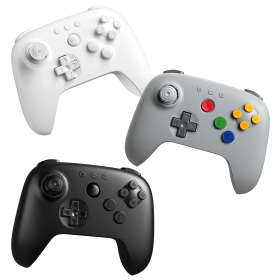
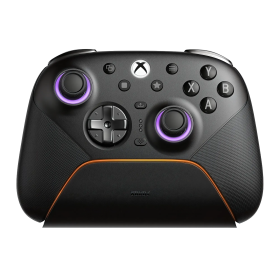
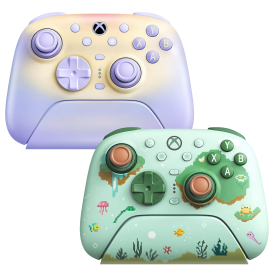
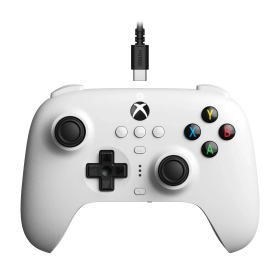
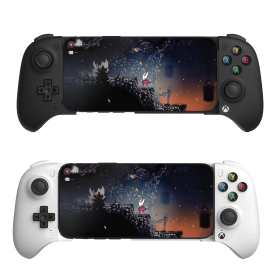
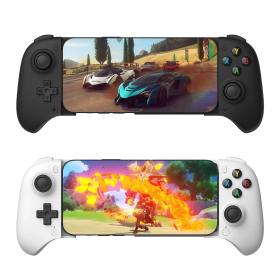
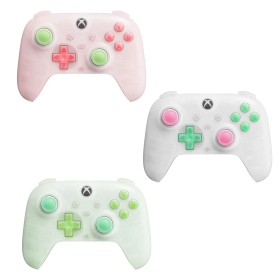
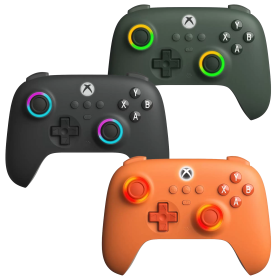
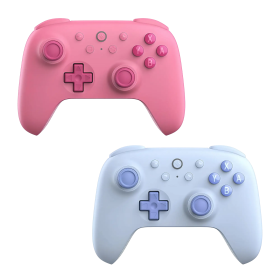
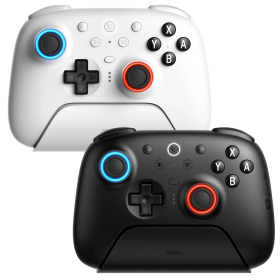
8BitDo Pro 3 Wireless Controller with Dock
zoom_out_map
Sold items

This item has been sold

21
times
8BitDo Pro 3 Wireless Controller with Dock
8BitDo Pro 3 Wireless Controller with Dock 8BitDo Pro 3 Wireless Controller with Dock 8BitDo Pro 3 Wireless Controller with Dock 8BitDo Pro 3 Wireless Controller with Dock 8BitDo Pro 3 Wireless Controller with Dock 8BitDo Pro 3 Wireless Controller with Dock 8BitDo Pro 3 Wireless Controller with Dock 8BitDo Pro 3 Wireless Controller with Dock

8BitDo Pro 3 Controller (Switch, PC, Steam Deck, Android, iOS, macOS)

The 8BitDo Pro 3 combines retro design with cutting-edge features for the ultimate wireless gaming experience across multiple platforms.

  • Three connection modes: Bluetooth, 2.4G wireless adapter, and wired USB for maximum compatibility
  • Premium TMR joysticks and Hall Effect triggers for drift-free precision and durability
  • Unique swappable magnetic ABXY buttons let you physically rearrange your button layout
  • Compatible with Switch 1 & 2, Windows PC, Apple devices, SteamOS, and Android
  • Includes charging dock, 2.4G adapter, ball-top joystick caps, and button puller tool
  • Pro back paddle buttons (L4/R4) and 1000mAh rechargeable battery for extended gaming sessions

€64.90 Tax included (23%)

12 in stock
Ships in 1 - 3 Days

Color

Color:

Sold items

This item has been sold

21
times

Your new favorite controller that bridges generations of gaming excellence.

The 8BitDo Pro 3 Wireless Controller is the latest evolution in 8BitDo's acclaimed Pro series, and it's easy to see why retro gaming enthusiasts are calling it the ultimate gamepad. Blending the iconic designs of Super Nintendo and PlayStation controllers with modern premium components, this controller delivers nostalgia and next-gen performance in one beautiful package.

Three Ways to Connect, Endless Possibilities

Flexibility is at the heart of the Pro 3. You get three connection options right out of the box: Bluetooth for wireless freedom, a 2.4G USB adapter for ultra-low latency gaming, and wired USB for zero-lag competitive play. The included charging dock keeps your controller powered up and ready to go, while the 1000mAh battery ensures you'll enjoy hours of uninterrupted gaming.

The 2.4G dongle is particularly clever—it acts as a standard USB gamepad device, which means you can use your Pro 3 with devices that might not have native controller support. Think MiSTer FPGA, Raspberry Pi, retro gaming handhelds, and more.

Drift-Free Premium Components

8BitDo hasn't cut any corners with the Pro 3. It features TMR (Tunneling Magneto-Resistance) joysticks that are significantly more durable and resistant to drift compared to traditional potentiometer-based sticks. The Hall Effect triggers use contactless magnetic sensors, eliminating wear and ensuring consistent, precise analog input even after thousands of gaming sessions.

The tactile D-pad offers that satisfying click retro gamers crave, perfect for fighting games and platformers. Add in two programmable Pro back paddle buttons (L4 and R4), and you've got a competitive edge in any game.

Physically Swappable Buttons—Yes, Really!

Here's where the Pro 3 gets truly unique: the ABXY buttons are held in place by magnets, and you can physically swap them around to match different console layouts. Prefer Xbox-style or Nintendo-style button arrangements? Just pop them out with the included button puller and rearrange them. The button legends match your layout, so there's no confusion.

The controller also includes ball-top joystick caps that give your controller a distinctly arcade feel—perfect for retro gaming purists who want that authentic experience.

Universal Compatibility

The Pro 3 works seamlessly with Nintendo Switch (including the new Switch 2), Windows PC, SteamOS, Android devices, and the entire Apple ecosystem—iOS, iPadOS, macOS, tvOS, and even visionOS. It supports multiple input modes including S-Input, X-Input, and D-Input depending on your connection method, ensuring broad compatibility with virtually any game.

Features like 6-axis motion control (for Switch and Steam), vibration, turbo function, and support for 8BitDo's Ultimate Software V2 round out an incredibly feature-rich package. You can customize button mappings, adjust stick sensitivity, fine-tune trigger response, and create multiple profiles for different games.

What's in the Box

Your Pro 3 package includes everything you need: the controller itself, a sleek charging dock, the 2.4G wireless adapter, USB charging cable, ABXY button puller tool, two ball-top joystick caps (color-matched to your controller variant), and a comprehensive instruction manual. At 242.4g, it strikes the perfect balance between substantial feel and comfortable weight for extended gaming sessions.

Whether you're diving into modern AAA titles, replaying retro classics on emulators, or competing in online tournaments, the 8BitDo Pro 3 delivers the precision, comfort, and versatility you need. It's the controller that finally brings together the best of classic gaming ergonomics and cutting-edge technology.

8BitDo
8bitdo-Pro3-GClassic
12 Items
Product Manufacturer
6922621507123
System
Android
Apple
Nintendo Switch
Nintendo Switch 2
SteamOS
Windows PC
Controller type
Gamepad
Special features
Gyroscope
Vibration
Device weight (g)
242.4
Battery category
Secondary, 1-50g
WEEE registration number
23582226
Battery weight (g)
30
Battery capacity (mAh)
1000
Device dimensions (W × H × D)
153.6 × 100.5 × 64.5 mm
Controller connector
USB
Connection type
2.4 GHz wireless
Bluetooth
Wired
Number of analog sticks
2
Connection compatibility
2.4 GHz wireless
Bluetooth
Wired USB
Stick technology
TMR
Trigger technology
Linear Hall + tactile trigger mode
Controller layout
Gamepad
Nintendo ABXY (SNES / Switch)
Xbox ABXY
Motion control
Yes (Switch/Steam)
Vibration
Yes
3.5 mm audio
No
Extra/back buttons
2 back paddles
3 profiles
L4/R4
Remapping/software
Ultimate Software V2
Charging dock included
Yes
Input modes (USB)
DInput
Switch mode
XInput
Input modes (Bluetooth)
DInput
Switch mode
Input modes (2.4 GHz)
Switch mode
XInput
Input mode switching
Rear switch: D selects DInput (Bluetooth/USB); S/X selects XInput on Windows (2.4G/USB), or Switch mode on Switch.
Deadzone adjustment
Zero deadzone toggle in software
Stick calibration
On controller
DRAGONBOX KNOW-HOW

Practical answers about compatibility, features and how things work.

What input modes are available: XInput, DInput, Switch and PlayStation?

XInput is the best choice for most PC gamers. This widely supported input mode follows the Xbox controller layout and is recognized directly by many modern Windows games. For most users, that is all they need. However, XInput support does not automatically mean a controller works on a real Xbox console.

DInput (DirectInput) is the older Windows standard. Some older PC games, such as Crimson Skies or Need for Speed: Underground 2, support DirectInput but not native XInput.

An additional DInput or generic USB HID mode can also be useful for retro gaming systems, FPGA devices, emulators and other specialized setups. Some devices support Xbox-compatible controllers, while others expect a standard USB HID gamepad. Which input modes work depends on the specific device and its software.

For example, MiSTer FPGA supports many USB controllers as well as Xbox-compatible input devices. Depending on the core, different button mappings or special input features may be required. DInput itself is therefore not a general requirement on MiSTer.

If you plan to use your controller with retro or FPGA systems, check which input modes are supported beforehand. A controller with several selectable modes offers more flexibility.

Switch mode makes the controller appear to compatible devices as a Nintendo Switch Pro Controller. It can be useful beyond the Switch: Steam Input, Linux and various applications can also support these controllers. However, not every PC game will recognize this mode automatically.

PlayStation mode can refer to different compatibility modes depending on the controller, such as PS4 controller or PlayStation Classic modes. There is no single universal PlayStation mode. Compatibility with a particular PlayStation console must be explicitly confirmed for the product.

Connection type matters: Not every input mode is available over every connection. Some controllers support DInput only via a USB cable, while others also offer it through a 2.4 GHz receiver or Bluetooth.

That is why our technical specifications list confirmed input modes separately for USB, 2.4 GHz and Bluetooth.

What is the difference between 2.4 GHz wireless and Bluetooth controllers?

Both types of connection are wireless and use the 2.4 GHz frequency band. The difference is the transmission technology: Bluetooth is a widely used standard, whereas “2.4 GHz wireless” usually refers to a manufacturer's own radio link with a matching receiver.

Bluetooth: flexible and widely compatible

Many PCs, gaming handhelds, smartphones, tablets and consoles support Bluetooth controllers. If the controller is compatible with the device, you usually pair it once through the Bluetooth settings. After that, it will normally reconnect automatically.

No additional receiver is needed, leaving a USB port free.

However, not every Bluetooth-enabled device supports every Bluetooth controller. Game consoles in particular may require certain controller models or input modes.

2.4 GHz wireless: plug in and play

Controllers using 2.4 GHz wireless usually come with a matching USB receiver (dongle). Plug it in and switch the controller on. The two are often paired already.

This offers several advantages:

  • No Bluetooth menu or Bluetooth manager setup is needed.
  • It also works with compatible devices that have no built-in Bluetooth.
  • Many systems recognize the receiver as a regular USB controller.
  • That can be particularly useful for PCs, retro systems and other devices with USB ports.

The device must still support the particular receiver and its input mode. Not every dongle automatically works with every system. Some retro controllers also use dedicated receivers for particular consoles.

What about speed?

Many 2.4 GHz controllers offer high polling rates and low, consistent latency. Modern Bluetooth controllers can also be very fast, however. Actual performance depends on the specific controller and connection.

Which connection should I choose?

Bluetooth is especially useful if you want to use a controller with different compatible devices without carrying an extra receiver.

2.4 GHz wireless is often a good choice if you want a straightforward setup, prefer a responsive connection, or use a device without Bluetooth.

Check the product's technical specifications to see which connections and systems it supports.

What do polling rate and latency mean for a controller?

Polling rate and latency both affect how quickly a controller responds to your inputs, but they describe two different things.

What is polling rate?

Polling rate describes how often the controller or its connection reports or requests new input data from the system.

It is measured in hertz (Hz).

Polling rateReporting interval
125 Hz8 milliseconds
250 Hz4 milliseconds
500 Hz2 milliseconds
1,000 Hz1 millisecond

The higher the polling rate, the shorter the interval between input reports can be.

A high polling rate can therefore be useful in fast-paced games. The connected system must also support the relevant reporting rate.

What is latency?

Latency is the delay between an action on the controller and the moment the system registers that input.

Several factors contribute to this delay:

  • How quickly the controller detects and processes the button press.
  • How long transmission via cable, Bluetooth or 2.4 GHz wireless takes.
  • How quickly the connected system processes the input.

Before the action becomes visible on the screen, the game and display introduce additional processing delays.

Does a 1,000 Hz polling rate automatically mean 1 ms of latency?

No. At 1,000 Hz, only the reporting interval is one millisecond. The total input delay can be considerably higher.

In practice, a well-optimized controller running at 500 Hz can therefore respond faster than a poorly optimized controller running at 1,000 Hz.

Which values matter?

For most games, consistently low latency matters more than the highest possible polling rate.

Low delays can be especially beneficial for fast action games, shooters and competitive games. In retro games, processing by emulators, consoles or FPGA systems and the display also matter.

Our tip: A high polling rate is an interesting technical specification, but does not by itself prove that a controller is fast. Measurements of real-world latency under comparable conditions are more meaningful.

What are Hall effect and TMR sticks, and how do conventional analog sticks work?

Modern controllers are often advertised as having Hall effect or TMR sticks. Both technologies aim to provide precise, long-lasting analog sticks. How do they differ from conventional designs?

Conventional analog sticks: potentiometers

Traditional analog sticks use potentiometers, in which a small electrical wiper moves along a resistive track.

The resulting change in electrical resistance is measured to determine the stick's position. Typically, two potentiometers are used to measure horizontal and vertical movement.

The drawback is that the resistive tracks can wear over time due to mechanical contact. Dust and dirt can also interfere with the measurement. One possible result is stick drift: the controller registers movement even though the stick is not being touched.

Hall effect sticks: magnetic sensing without electrical contact

Hall effect sticks use magnets and specialized sensors to determine the position of the analog stick.

They measure changes in a magnetic field, so they do not require the electrical wiper contact used by conventional potentiometers.

This removes a common source of wear. Hall effect sticks are therefore much less susceptible to stick drift caused by worn potentiometer contacts.

TMR sticks: a different magnetic sensor technology

TMR stands for Tunnel Magnetoresistance.

Like Hall effect sticks, TMR sticks sense their position without electrical contact, using magnets. However, the measurement principle is different: the sensors detect changes in electrical resistance caused by the magnetic field.

TMR sensors can be particularly sensitive to small changes and, depending on their design, may consume less power than comparable Hall sensors.

That does not automatically mean every TMR controller is more precise or has better battery life. The electronics, calibration and processing of the sensor readings matter as well.

Are Hall effect and TMR sticks completely immune to stick drift?

No. Both technologies avoid wear of the conventional electrical wiper contacts, but the sticks still contain mechanical components.

For example, return springs can wear, dirt can obstruct movement, and calibration problems can occur. Hall effect and TMR sticks can therefore still report unintended movement.

However, the risk of classic stick drift caused by worn potentiometer tracks is significantly reduced.

How do the triggers (shoulder buttons) work?

Analog triggers, such as LT/RT or L2/R2, can use similar sensing methods:

  • Potentiometer triggers: Trigger position is measured through a change in electrical resistance.
  • Hall effect triggers: Position is measured without electrical contact, using a magnetic field. This eliminates wear from an electrical wiper contact.
  • Digital triggers: These work like regular buttons and detect only whether they are pressed. They do not measure a continuously variable position.

Analog triggers are useful in racing games, for example, because they allow fine control over acceleration and braking. Digital triggers can be useful in games that only need a quick button press.

Which technology is best?

Well-designed Hall effect and TMR sticks offer clear advantages over conventional potentiometers in terms of sensor wear.

TMR may also offer benefits in sensitivity and power consumption. However, a well-designed Hall effect stick can perform just as well as, or better than, a poorly designed TMR stick.

Besides the sensor technology, the mechanics, calibration and overall quality of the controller are equally important.

What is the difference between 8BitDo Pro and Ultimate controllers?

At 8BitDo, “Ultimate” does not automatically mean “better” than “Pro”. The main difference between the two series is their shape and the arrangement of the D-pad and analog sticks.

Pro series: Inspired by classic SNES and PlayStation controllers. The D-pad sits at the upper left, with the left analog stick below it. The two analog sticks are symmetrically positioned. This layout appeals to fans of classic controllers and players who often use the D-pad.

Ultimate series: Inspired by modern Xbox and Nintendo Switch Pro controllers. Here the positions are reversed: the left analog stick is at the upper left, with the D-pad below it. The analog sticks are offset.

Important: The series name does not tell you which controller has more features or better technology. Connectivity, supported platforms, stick technology, triggers and extra features vary by model. Choose based on your preferred layout and the individual controller's specifications.

How do I enable zero-deadzone mode and calibrate the sticks on the 8BitDo Pro 3?

The 8BitDo Pro 3 supports a zero-deadzone mode, which is configured using 8BitDo Ultimate Software V2. This setting is separate from stick calibration.

Calibrate sticks and triggers: Power on the controller, then hold L1 + R1 + SELECT for about 8 seconds until the status LED blinks. Slowly move both analog sticks to their outer edges and rotate them fully two or three times. Slowly press both triggers to their stops two or three times each. Press L1 + R1 + SELECT again to finish.

Recalibration is normally unnecessary and is best reserved for incorrect or unstable input readings.

Manufacturer
8BITDO TECHNOLOGY HK LIMITED
610 Nathan Road
Rooms 1318-19, 13/F, Hollywood Plaza,
Mongkok, Kowloon
Hong Kong SAR China
EU responsible person
OpenPandora GmbH
+49 841 1317733
Asternweg 5
Michael Mrozek
85080 Gaimersheim
Germany
chat Comments (0)
8BitDo Pro 3 Controller (Switch, PC, Steam Deck, Android, iOS, macOS)
€64.90