




|
This item has been sold |
| 223 | |
| times |


Defender Bluetooth Edition (PS3/PS4)

The Defender Bluetooth Edition brings retro vibes and modern wireless tech to your PS3, PS4, and PC gaming sessions!
- True wireless Bluetooth connection - no dongle required
- Full SixAxis motion control and pressure-sensitive buttons
- Turbo functionality for competitive edge
- Vibration feedback and ergonomic design
- 30+ feet wireless range with rechargeable battery
- USB-C charging cable included
Experience classic PlayStation gaming with a wireless controller that actually works!
The Defender Bluetooth Edition from Retro Fighters is your ticket to hassle-free wireless gaming on PS3 and PS4. Unlike some third-party controllers that promise the world but deliver frustration, this one actually delivers on its promises. It connects seamlessly via Bluetooth without needing any additional dongles or adapters - just pair it like you would an original Sony controller and you're ready to game.
What makes the Defender stand out is its complete feature set. You get full SixAxis motion control support, pressure-sensitive buttons that respond to how hard you press them, and all the wireless freedom you need with a range of over 30 feet. Whether you're playing from your couch or across the room, you'll stay connected. The controller also packs turbo functionality, which is perfect for games that require rapid button presses, giving you a competitive edge without wearing out your thumb.
Designed for Comfort and Performance
Retro Fighters didn't just focus on functionality - they made sure this controller feels great in your hands too. The ergonomic shape fits naturally, while the responsive analog sticks give you precise control whether you're navigating menus or pulling off complex combos. Vibration feedback adds that extra layer of immersion, letting you feel every explosion, crash, and impact. The LED indicator keeps you informed about battery status and connection, so you'll never be caught off guard mid-game.
PC Compatibility Too
Want to use your Defender on PC? No problem! Simply connect it via the included USB-C charging cable and you're good to go. It's a wired connection for PC use, but it opens up your gaming library even further. The USB-C cable also handles charging duties, keeping your controller powered up and ready for your next gaming marathon.

- System
- PlayStation 3
PlayStation 4
Windows PC - Brand compatibility
- Sony
- Battery category
- Secondary, 1-50g
- WEEE registration number
- 23582226
- Battery weight (g)
- 40
- Connection type
- Bluetooth
Wired - Number of analog sticks
- 2
- Connection compatibility
- Bluetooth
Wired USB - Stick technology
- Standard
- Trigger technology
- Analog
- Controller layout
- PlayStation symbol buttons (triangle/circle/cross/square)
- Motion control
- Yes
- Vibration
- Yes
- Input mode switching
- Bluetooth: native PS3/PS4 controller mode only. First-time PS3 pairing: connect USB-C, then disconnect. Windows PC: wired USB only; PC Bluetooth is NOT supported. Separate XInput/DInput modes are not officially documented.
Practical answers about compatibility, features and how things work.
What is the difference between 2.4 GHz wireless and Bluetooth controllers?
Both types of connection are wireless and use the 2.4 GHz frequency band. The difference is the transmission technology: Bluetooth is a widely used standard, whereas “2.4 GHz wireless” usually refers to a manufacturer's own radio link with a matching receiver.
Bluetooth: flexible and widely compatible
Many PCs, gaming handhelds, smartphones, tablets and consoles support Bluetooth controllers. If the controller is compatible with the device, you usually pair it once through the Bluetooth settings. After that, it will normally reconnect automatically.
No additional receiver is needed, leaving a USB port free.
However, not every Bluetooth-enabled device supports every Bluetooth controller. Game consoles in particular may require certain controller models or input modes.
2.4 GHz wireless: plug in and play
Controllers using 2.4 GHz wireless usually come with a matching USB receiver (dongle). Plug it in and switch the controller on. The two are often paired already.
This offers several advantages:
- No Bluetooth menu or Bluetooth manager setup is needed.
- It also works with compatible devices that have no built-in Bluetooth.
- Many systems recognize the receiver as a regular USB controller.
- That can be particularly useful for PCs, retro systems and other devices with USB ports.
The device must still support the particular receiver and its input mode. Not every dongle automatically works with every system. Some retro controllers also use dedicated receivers for particular consoles.
What about speed?
Many 2.4 GHz controllers offer high polling rates and low, consistent latency. Modern Bluetooth controllers can also be very fast, however. Actual performance depends on the specific controller and connection.
Which connection should I choose?
Bluetooth is especially useful if you want to use a controller with different compatible devices without carrying an extra receiver.
2.4 GHz wireless is often a good choice if you want a straightforward setup, prefer a responsive connection, or use a device without Bluetooth.
Check the product's technical specifications to see which connections and systems it supports.
Manufacturer
EU responsible person









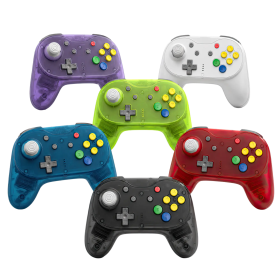
Brawler64 Pro
Hall Effect analog stick with 8-way notched gate – no drift, no wear
2.4GHz wireless + wired USB mode with 1000Hz polling rate
Programmable back buttons & adjustable rumble
Compatible with N64, Nintendo Switch, Switch 2, PC, Steam Deck & MiSTer FPGA
Magnetic faceplate system for instant color swaps
Includes: controller, N64 Retro Receiver, USB Receiver, braided USB-C cable, quick start manual

BattleDock (Nintendo Switch 2)
4× GameCube controller ports with ultra-low input latency
Plug & Play – just slide in your dock, connect via USB, and you're good to go
4 magnetic swappable faceplates in classic GameCube colors included
Compatible with wired & wireless GC controllers (e.g. WaveBird)

Defender Pro (PSX / PS2 / PS3 / PC / Switch)
Hall Effect analog sticks eliminate stick drift for precise control
Dual wireless modes: 2.4GHz and Bluetooth with 30+ foot range
Programmable back grip buttons and pressure-sensitive face buttons
1000Hz polling rate for ultra-low latency performance
Switch between analog and digital trigger modes on the fly
Complete package with PS1/2 receiver, USB receiver, and braided USB-C cable

Hunter360 Controller (XBox360)
Hall Effect analog sticks guarantee zero drift and ultimate precision
Ultra-responsive 1000Hz polling rate for pro-level performance
Reliable 2.4GHz wireless with 30+ feet range and 10+ hour battery life
Compatible with Xbox 360, PC, Steam, and Android devices
USB-C charging and customizable rumble intensity

D6 Dreamcast Controller (Dreamcast / Switch / PC)

BattlerGC Pro Wireless Controller (GameCube)
Dual wireless: 2.4 GHz & Bluetooth for GameCube, Wii, Switch & PC
Hall Effect sensors eliminate stick drift forever
Premium Kailh® switches and authentic GC-style analog triggers
10+ hours battery life with wireless vibration feedback
Ergonomic design with dual Z buttons and programmable back buttons

Mantis Wireless Mini Bluetooth Controller (PS4 / PC)

Brawler64 Bluetooth NSO Limited Gold Edition
Brawler64 Bluetooth NSO Edition
Hunter XBOX® Wireless gamepad
Hall Effect analog sticks and triggers guarantee zero drift, ever
2.4 GHz wireless technology with 10+ hour rechargeable battery
Compatible with original XBOX®, Nintendo Switch® and Windows PC
Wireless rumble, pressure-sensitive buttons, and ergonomic design
Premium textured grips and precise D-pad for ultimate control
Easy sync and setup with low-latency wireless connection
BattlerGC Wireless Controller (GameCube, Switch, PC)
Defender 2.4G (PSX / PS2)
2.4GHz wireless technology with over 9m range for lag-free gaming
Pressure-sensitive buttons preserve authentic PlayStation gameplay
Turbo functionality and vibration feedback for enhanced control
Compatible with PS1, PS2, PS3, PS Classic, Nintendo Switch and PC
Includes USB receiver, PS1/PS2 receiver and charging cable
Brawler64 Pro
Hall Effect analog stick with 8-way notched gate – no drift, no wear
2.4GHz wireless + wired USB mode with 1000Hz polling rate
Programmable back buttons & adjustable rumble
Compatible with N64, Nintendo Switch, Switch 2, PC, Steam Deck & MiSTer FPGA
Magnetic faceplate system for instant color swaps
Includes: controller, N64 Retro Receiver, USB Receiver, braided USB-C cable, quick start manual
BattleDock (Nintendo Switch 2)
4× GameCube controller ports with ultra-low input latency
Plug & Play – just slide in your dock, connect via USB, and you're good to go
4 magnetic swappable faceplates in classic GameCube colors included
Compatible with wired & wireless GC controllers (e.g. WaveBird)
Defender Pro (PSX / PS2 / PS3 / PC / Switch)
Hall Effect analog sticks eliminate stick drift for precise control
Dual wireless modes: 2.4GHz and Bluetooth with 30+ foot range
Programmable back grip buttons and pressure-sensitive face buttons
1000Hz polling rate for ultra-low latency performance
Switch between analog and digital trigger modes on the fly
Complete package with PS1/2 receiver, USB receiver, and braided USB-C cable
Hunter360 Controller (XBox360)
Hall Effect analog sticks guarantee zero drift and ultimate precision
Ultra-responsive 1000Hz polling rate for pro-level performance
Reliable 2.4GHz wireless with 30+ feet range and 10+ hour battery life
Compatible with Xbox 360, PC, Steam, and Android devices
USB-C charging and customizable rumble intensity
D6 Dreamcast Controller (Dreamcast / Switch / PC)
BattlerGC Pro Wireless Controller (GameCube)
Dual wireless: 2.4 GHz & Bluetooth for GameCube, Wii, Switch & PC
Hall Effect sensors eliminate stick drift forever
Premium Kailh® switches and authentic GC-style analog triggers
10+ hours battery life with wireless vibration feedback
Ergonomic design with dual Z buttons and programmable back buttons
Mantis Wireless Mini Bluetooth Controller (PS4 / PC)

Retro85 Mini NES Cartridge Switch Game Cases
Brawler64 Bluetooth NSO Limited Gold Edition
Brawler64 Bluetooth NSO Edition
Hunter XBOX® Wireless gamepad
Hall Effect analog sticks and triggers guarantee zero drift, ever
2.4 GHz wireless technology with 10+ hour rechargeable battery
Compatible with original XBOX®, Nintendo Switch® and Windows PC
Wireless rumble, pressure-sensitive buttons, and ergonomic design
Premium textured grips and precise D-pad for ultimate control
Easy sync and setup with low-latency wireless connection