




|
This item has been sold |
| 13 | |
| times |

FightBox Arcadestick R10 Pro 6-Buttons with Trackball + Spinner (PC/PS3/PS4/NSW/NSW2)

The FightBox R10 PRO (6-Button) is a true arcade all-rounder: Sanwa joystick, illuminated 3" trackball, spinner and pinball buttons – all in one sturdy metal case, one USB cable, zero compromises.
- Sanwa joystick with authentic arcade feel in Vewlix layout
- 3" LED trackball for Centipede, Marble Madness, golf classics & more
- Spinner for Arkanoid, Tempest and more – aluminium knob with adjustable height
- Pinball buttons on the side for flipper action without remapping
- Under 1 ms latency thanks to GP2040-CE firmware on Raspberry Pi Pico
- Compatible with PC, PS3, PS4, Switch 1 & 2 – trackball/spinner PC only
FightBox R10 PRO – Sanwa Stick, Trackball and Spinner in One
Don't want five different controllers for five different arcade genres? The FightBox R10 PRO (6-Button) makes that unnecessary. Joystick, 3" LED trackball and spinner all share a transparent acrylic panel inside a solid metal case – running off a single USB cable. Sounds good? It is. With a measured average latency of 0.8 ms (never exceeding 1.3 ms), input lag is simply not a concern here.
The Joystick – Genuine Sanwa, Genuine Arcade Feel
At the heart of the R10 PRO sits a genuine Sanwa joystick in Vewlix layout with 6 main buttons plus two side buttons for pinball flippers or special functions. Dedicated Insert Coin and Start buttons round off the authentic arcade cabinet experience perfectly. The buttons themselves are BAOLIAN components – solid, but not quite on Sanwa level: slightly longer travel, slightly less snap. Swapping them out is well-documented in the community if that bothers you. The stock square gate is classically Japanese-style; an octagonal gate is an easy upgrade if preferred.
The Trackball – 3" LED-Lit, for True Retro Classics
The built-in 3" LED trackball brings games like Centipede, Marble Madness, Golden Tee Golf or bowling classics to life exactly as they were meant to be played – precise, responsive, and with the tactile feedback of a real arcade machine. Important: Trackball and spinner work on PC only. On PS3, PS4 or Switch, only the joystick functionality is active. Also, when using the spinner, be mindful not to rest your wrist on the trackball accidentally – it causes unwanted movement. If needed, both can be disabled via your system settings.
The Spinner – Aluminium Knob, Adjustable Height
For games like Arkanoid, Tempest or other dial-controlled classics, the integrated spinner with its solid aluminium knob is the right tool. Height is adjustable to personal preference, and the spin feels smooth and precise. Again: spinner functionality is PC-only.
The Case – Metal, Acrylic, Rubber Feet
The sturdy metal case (approx. 2.2 kg) gives the R10 PRO a satisfying solidity – rubber feet keep it firmly planted on your desk even during intense Tempest sessions. The transparent acrylic panel looks sharp, is lightweight and wear-resistant. Dimensions: approx. 35 × 21 cm, height 6 cm, cable 3 m.
Tech & Compatibility
Under the hood, the FightBox GP2040-CE Advanced Breakout Board runs on a Raspberry Pi Pico with GP2040 Community Edition firmware – the same foundation used in serious tournament sticks. The joystick works with PC, PS3, PS4, Switch 1 and Switch 2. Emulation platforms such as MiSTer FPGA, RetroArch, Recalbox, RetroPie, Lakka and EmuELEC are supported. Note on Batocera: There are reports of trackball and spinner not working out of the box – on PC via RetroArch or directly in titles like Pinball FX everything runs smoothly.
Technical Details at a Glance
| Joystick | Sanwa Brand Arcade Stick |
| Buttons | 6 main + 2 side buttons (BAOLIAN) + Coin/Start |
| Trackball | 3" LED-illuminated, PC only |
| Spinner | Aluminium knob, adjustable height, PC only |
| Controller Board | FightBox GP2040-CE, Raspberry Pi Pico |
| Firmware | GP2040 Community Edition |
| Compatibility (Joystick) | PC, PS3, PS4, Switch 1, Switch 2 |
| Emulation Support | MiSTer FPGA, RetroArch, Recalbox, Batocera*, RetroPie, Lakka, EmuELEC |
| Case | Metal |
| Panel | Transparent Acrylic |
| Panel Size | 35 × 21 cm |
| Height | 6 cm |
| Weight | approx. 2.2 kg |
| Cable Length | approx. 3 m |
| Latency | < 1 ms (avg. 0.8 ms) |

- System
- Linux PC
Nintendo Switch
Nintendo Switch 2
PlayStation 3
PlayStation 4
Windows PC - Controller type
- Joystick
Spinner
Trackball - Device weight (g)
- 2500
- Controller connector
- USB
- Connection type
- Wired
- Number of analog sticks
- 0
- Input modes (USB)
- DInput
Switch mode
XInput - Input mode switching
- USB (GP2040-CE): boot holding B1 for Switch, B2 for XInput, B3 for PS3/DirectInput. Default boot buttons can be changed in the web configurator. Trackball/spinner are separate PC mouse inputs.
Practical answers about compatibility, features and how things work.
What input modes are available: XInput, DInput, Switch and PlayStation?
XInput is the best choice for most PC gamers. This widely supported input mode follows the Xbox controller layout and is recognized directly by many modern Windows games. For most users, that is all they need. However, XInput support does not automatically mean a controller works on a real Xbox console.
DInput (DirectInput) is the older Windows standard. Some older PC games, such as Crimson Skies or Need for Speed: Underground 2, support DirectInput but not native XInput.
An additional DInput or generic USB HID mode can also be useful for retro gaming systems, FPGA devices, emulators and other specialized setups. Some devices support Xbox-compatible controllers, while others expect a standard USB HID gamepad. Which input modes work depends on the specific device and its software.
For example, MiSTer FPGA supports many USB controllers as well as Xbox-compatible input devices. Depending on the core, different button mappings or special input features may be required. DInput itself is therefore not a general requirement on MiSTer.
If you plan to use your controller with retro or FPGA systems, check which input modes are supported beforehand. A controller with several selectable modes offers more flexibility.
Switch mode makes the controller appear to compatible devices as a Nintendo Switch Pro Controller. It can be useful beyond the Switch: Steam Input, Linux and various applications can also support these controllers. However, not every PC game will recognize this mode automatically.
PlayStation mode can refer to different compatibility modes depending on the controller, such as PS4 controller or PlayStation Classic modes. There is no single universal PlayStation mode. Compatibility with a particular PlayStation console must be explicitly confirmed for the product.
Connection type matters: Not every input mode is available over every connection. Some controllers support DInput only via a USB cable, while others also offer it through a 2.4 GHz receiver or Bluetooth.
That is why our technical specifications list confirmed input modes separately for USB, 2.4 GHz and Bluetooth.
What do polling rate and latency mean for a controller?
Polling rate and latency both affect how quickly a controller responds to your inputs, but they describe two different things.
What is polling rate?
Polling rate describes how often the controller or its connection reports or requests new input data from the system.
It is measured in hertz (Hz).
| Polling rate | Reporting interval |
|---|---|
| 125 Hz | 8 milliseconds |
| 250 Hz | 4 milliseconds |
| 500 Hz | 2 milliseconds |
| 1,000 Hz | 1 millisecond |
The higher the polling rate, the shorter the interval between input reports can be.
A high polling rate can therefore be useful in fast-paced games. The connected system must also support the relevant reporting rate.
What is latency?
Latency is the delay between an action on the controller and the moment the system registers that input.
Several factors contribute to this delay:
- How quickly the controller detects and processes the button press.
- How long transmission via cable, Bluetooth or 2.4 GHz wireless takes.
- How quickly the connected system processes the input.
Before the action becomes visible on the screen, the game and display introduce additional processing delays.
Does a 1,000 Hz polling rate automatically mean 1 ms of latency?
No. At 1,000 Hz, only the reporting interval is one millisecond. The total input delay can be considerably higher.
In practice, a well-optimized controller running at 500 Hz can therefore respond faster than a poorly optimized controller running at 1,000 Hz.
Which values matter?
For most games, consistently low latency matters more than the highest possible polling rate.
Low delays can be especially beneficial for fast action games, shooters and competitive games. In retro games, processing by emulators, consoles or FPGA systems and the display also matter.
Our tip: A high polling rate is an interesting technical specification, but does not by itself prove that a controller is fast. Measurements of real-world latency under comparable conditions are more meaningful.
Manufacturer
EU responsible person


DragonBox Shop Coffee Mug
Official DragonBox merchandise with shop logo and URL
Ceramic – dishwasher safe
Fill volume 320 ml (total volume 400 ml)
White outside, green inside, green handle


PlayStation Coffee Mug
Official PlayStation merchandise featuring classic button symbols
Perfect 0.3 L capacity for coffee, tea, or any hot beverage
High-quality ceramic construction built for daily use
Ideal gift for PlayStation fans and collectors
Features the legendary triangle, circle, X, and square icons
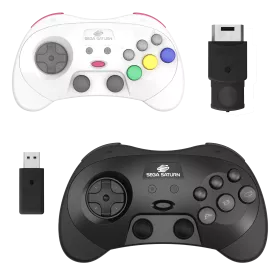

SEGA Saturn 2.4GHz Pro Controller (Wireless)

FightBox R2 Arcadestick (SNK NeoGeo MVS / AES / CD)
Spinner Racing Kit (for FightBox R10 Pro)
21 cm steering wheel mounts directly onto the Spinner knob
Dual pedals Plug-and-Play via USB, pre-mapped to X and M keys
Compatible with FightBox R5, R9 and R10-PRO
Ready to use with MAME, RetroArch & more
Spinner Racing Kit (for FightBox R10 Pro)
21 cm steering wheel mounts directly onto the Spinner knob
Dual pedals Plug-and-Play via USB, pre-mapped to X and M keys
Compatible with FightBox R5, R9 and R10-PRO
Ready to use with MAME, RetroArch & more
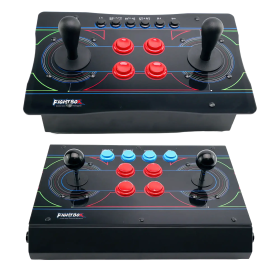
FightBox Twin Stick R10 (PC/PS3/PS4/NSW)
Two full-sized arcade joysticks for authentic twin-stick gameplay
Sanwa or HAPP sticks selectable (check product variant)
Metal case with transparent acrylic panel
GP2040-CE firmware on Raspberry Pi Pico – zero delay
Compatible with PC, PS3, PS4 & Nintendo Switch

FightBox R3 Arcadestick (Sega Mega Drive)

FightBox Trackball R6 (PC)
Spinner Racing Kit (for FightBox R10 Pro)
21 cm steering wheel mounts directly onto the Spinner knob
Dual pedals Plug-and-Play via USB, pre-mapped to X and M keys
Compatible with FightBox R5, R9 and R10-PRO
Ready to use with MAME, RetroArch & more
FightBox Twin Stick R10 (PC/PS3/PS4/NSW)
Two full-sized arcade joysticks for authentic twin-stick gameplay
Sanwa or HAPP sticks selectable (check product variant)
Metal case with transparent acrylic panel
GP2040-CE firmware on Raspberry Pi Pico – zero delay
Compatible with PC, PS3, PS4 & Nintendo Switch