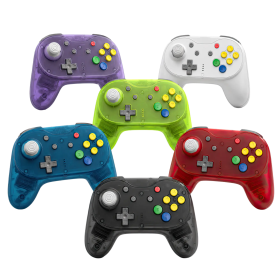

Hunter360 Wireless Controller for XBox360
zoom_out_map
Sold items

This item has been sold

109
times
Hunter360 Wireless Controller for XBox360
Hunter360 Wireless Controller for XBox360 Hunter360 Wireless Controller for XBox360 Hunter360 Wireless Controller for XBox360 Hunter360 Wireless Controller for XBox360 Hunter360 Wireless Controller for XBox360 Hunter360 Wireless Controller for XBox360 Hunter360 Wireless Controller for XBox360

Hunter360 Controller (XBox360)

Experience gaming perfection with the Retro Fighters Hunter 360 Wireless Controller – where classic Xbox 360 design meets cutting-edge technology!

  • Hall Effect analog sticks guarantee zero drift and ultimate precision
  • Ultra-responsive 1000Hz polling rate for pro-level performance
  • Reliable 2.4GHz wireless with 30+ feet range and 10+ hour battery life
  • Compatible with Xbox 360, PC, Steam, and Android devices
  • USB-C charging and customizable rumble intensity

€57.98

If you are living outside of the EU, import taxes might be charged. Please check this with your government

3 in stock
Ships in 1 - 3 Days

Color

Color:

Sold items

This item has been sold

109
times

The controller that refuses to compromise – nostalgia meets next-gen performance!

Remember the iconic Xbox 360 controller that felt just right in your hands? The Retro Fighters Hunter 360 Wireless Controller takes that legendary design and supercharges it with modern technology that serious gamers demand. Whether you're diving into retro classics or competing in today's most demanding titles, this controller delivers the precision and reliability you need to dominate.

Hall Effect Technology – Say Goodbye to Stick Drift Forever

Tired of controllers that develop drift after a few months? The Hunter 360 features advanced Hall Effect analog sticks that use magnetic sensors instead of traditional potentiometers. This means your controller will maintain factory-fresh precision for years to come. No more frustrating drift, no more wasted money on replacements – just pure, accurate control every single time you play.

Lightning-Fast Response When Every Millisecond Counts

With an impressive 1000Hz polling rate and ultra-low latency 2.4GHz wireless technology, the Hunter 360 responds to your inputs faster than you can blink. Whether you're landing frame-perfect combos or making split-second decisions in competitive matches, this controller keeps up with your skills. Enjoy wireless freedom with over 30 feet of range and 10+ hours of battery life per charge, so you can game marathon sessions without interruption.

Maximum Compatibility and Customization

The Hunter 360 works seamlessly with your original Xbox 360 console, Windows PC, Steam, and even Android devices. Switch between Xinput and Dinput modes to ensure compatibility with virtually any game. The included USB wireless receiver works with both 360 and PC, while the convenient USB-C charging port means no more hunting for batteries. Fine-tune your experience with built-in stick calibration mode and adjustable rumble intensity to match your gaming style perfectly.

RF-X360-BLK
3 Items
850046080456
System
Android
Windows PC
Xbox 360
Controller type
Gamepad
Brand compatibility
Microsoft
Battery category
Secondary, 1-50g
Battery weight (g)
40
Connection type
2.4 GHz wireless
Number of analog sticks
2
Connection compatibility
2.4 GHz wireless
Stick technology
Hall effect
Controller layout
Gamepad
Xbox ABXY
Vibration
Yes
Extra/back buttons
1000 Hz
Input modes (2.4 GHz)
DInput
XInput
Input mode switching
Windows PC: use the bundled 2.4G USB receiver; XInput and DInput modes are supported. Original Xbox 360 uses the dedicated console receiver. Not a Nintendo Switch controller. Exact mode-switch combo is not yet verified.
Stick calibration
On controller
Stick response curve
Standard / Xbox 360 selectable
DRAGONBOX KNOW-HOW

Practical answers about compatibility, features and how things work.

What input modes are available: XInput, DInput, Switch and PlayStation?

XInput is the best choice for most PC gamers. This widely supported input mode follows the Xbox controller layout and is recognized directly by many modern Windows games. For most users, that is all they need. However, XInput support does not automatically mean a controller works on a real Xbox console.

DInput (DirectInput) is the older Windows standard. Some older PC games, such as Crimson Skies or Need for Speed: Underground 2, support DirectInput but not native XInput.

An additional DInput or generic USB HID mode can also be useful for retro gaming systems, FPGA devices, emulators and other specialized setups. Some devices support Xbox-compatible controllers, while others expect a standard USB HID gamepad. Which input modes work depends on the specific device and its software.

For example, MiSTer FPGA supports many USB controllers as well as Xbox-compatible input devices. Depending on the core, different button mappings or special input features may be required. DInput itself is therefore not a general requirement on MiSTer.

If you plan to use your controller with retro or FPGA systems, check which input modes are supported beforehand. A controller with several selectable modes offers more flexibility.

Switch mode makes the controller appear to compatible devices as a Nintendo Switch Pro Controller. It can be useful beyond the Switch: Steam Input, Linux and various applications can also support these controllers. However, not every PC game will recognize this mode automatically.

PlayStation mode can refer to different compatibility modes depending on the controller, such as PS4 controller or PlayStation Classic modes. There is no single universal PlayStation mode. Compatibility with a particular PlayStation console must be explicitly confirmed for the product.

Connection type matters: Not every input mode is available over every connection. Some controllers support DInput only via a USB cable, while others also offer it through a 2.4 GHz receiver or Bluetooth.

That is why our technical specifications list confirmed input modes separately for USB, 2.4 GHz and Bluetooth.

What is the difference between 2.4 GHz wireless and Bluetooth controllers?

Both types of connection are wireless and use the 2.4 GHz frequency band. The difference is the transmission technology: Bluetooth is a widely used standard, whereas “2.4 GHz wireless” usually refers to a manufacturer's own radio link with a matching receiver.

Bluetooth: flexible and widely compatible

Many PCs, gaming handhelds, smartphones, tablets and consoles support Bluetooth controllers. If the controller is compatible with the device, you usually pair it once through the Bluetooth settings. After that, it will normally reconnect automatically.

No additional receiver is needed, leaving a USB port free.

However, not every Bluetooth-enabled device supports every Bluetooth controller. Game consoles in particular may require certain controller models or input modes.

2.4 GHz wireless: plug in and play

Controllers using 2.4 GHz wireless usually come with a matching USB receiver (dongle). Plug it in and switch the controller on. The two are often paired already.

This offers several advantages:

  • No Bluetooth menu or Bluetooth manager setup is needed.
  • It also works with compatible devices that have no built-in Bluetooth.
  • Many systems recognize the receiver as a regular USB controller.
  • That can be particularly useful for PCs, retro systems and other devices with USB ports.

The device must still support the particular receiver and its input mode. Not every dongle automatically works with every system. Some retro controllers also use dedicated receivers for particular consoles.

What about speed?

Many 2.4 GHz controllers offer high polling rates and low, consistent latency. Modern Bluetooth controllers can also be very fast, however. Actual performance depends on the specific controller and connection.

Which connection should I choose?

Bluetooth is especially useful if you want to use a controller with different compatible devices without carrying an extra receiver.

2.4 GHz wireless is often a good choice if you want a straightforward setup, prefer a responsive connection, or use a device without Bluetooth.

Check the product's technical specifications to see which connections and systems it supports.

What do polling rate and latency mean for a controller?

Polling rate and latency both affect how quickly a controller responds to your inputs, but they describe two different things.

What is polling rate?

Polling rate describes how often the controller or its connection reports or requests new input data from the system.

It is measured in hertz (Hz).

Polling rateReporting interval
125 Hz8 milliseconds
250 Hz4 milliseconds
500 Hz2 milliseconds
1,000 Hz1 millisecond

The higher the polling rate, the shorter the interval between input reports can be.

A high polling rate can therefore be useful in fast-paced games. The connected system must also support the relevant reporting rate.

What is latency?

Latency is the delay between an action on the controller and the moment the system registers that input.

Several factors contribute to this delay:

  • How quickly the controller detects and processes the button press.
  • How long transmission via cable, Bluetooth or 2.4 GHz wireless takes.
  • How quickly the connected system processes the input.

Before the action becomes visible on the screen, the game and display introduce additional processing delays.

Does a 1,000 Hz polling rate automatically mean 1 ms of latency?

No. At 1,000 Hz, only the reporting interval is one millisecond. The total input delay can be considerably higher.

In practice, a well-optimized controller running at 500 Hz can therefore respond faster than a poorly optimized controller running at 1,000 Hz.

Which values matter?

For most games, consistently low latency matters more than the highest possible polling rate.

Low delays can be especially beneficial for fast action games, shooters and competitive games. In retro games, processing by emulators, consoles or FPGA systems and the display also matter.

Our tip: A high polling rate is an interesting technical specification, but does not by itself prove that a controller is fast. Measurements of real-world latency under comparable conditions are more meaningful.

What are Hall effect and TMR sticks, and how do conventional analog sticks work?

Modern controllers are often advertised as having Hall effect or TMR sticks. Both technologies aim to provide precise, long-lasting analog sticks. How do they differ from conventional designs?

Conventional analog sticks: potentiometers

Traditional analog sticks use potentiometers, in which a small electrical wiper moves along a resistive track.

The resulting change in electrical resistance is measured to determine the stick's position. Typically, two potentiometers are used to measure horizontal and vertical movement.

The drawback is that the resistive tracks can wear over time due to mechanical contact. Dust and dirt can also interfere with the measurement. One possible result is stick drift: the controller registers movement even though the stick is not being touched.

Hall effect sticks: magnetic sensing without electrical contact

Hall effect sticks use magnets and specialized sensors to determine the position of the analog stick.

They measure changes in a magnetic field, so they do not require the electrical wiper contact used by conventional potentiometers.

This removes a common source of wear. Hall effect sticks are therefore much less susceptible to stick drift caused by worn potentiometer contacts.

TMR sticks: a different magnetic sensor technology

TMR stands for Tunnel Magnetoresistance.

Like Hall effect sticks, TMR sticks sense their position without electrical contact, using magnets. However, the measurement principle is different: the sensors detect changes in electrical resistance caused by the magnetic field.

TMR sensors can be particularly sensitive to small changes and, depending on their design, may consume less power than comparable Hall sensors.

That does not automatically mean every TMR controller is more precise or has better battery life. The electronics, calibration and processing of the sensor readings matter as well.

Are Hall effect and TMR sticks completely immune to stick drift?

No. Both technologies avoid wear of the conventional electrical wiper contacts, but the sticks still contain mechanical components.

For example, return springs can wear, dirt can obstruct movement, and calibration problems can occur. Hall effect and TMR sticks can therefore still report unintended movement.

However, the risk of classic stick drift caused by worn potentiometer tracks is significantly reduced.

How do the triggers (shoulder buttons) work?

Analog triggers, such as LT/RT or L2/R2, can use similar sensing methods:

  • Potentiometer triggers: Trigger position is measured through a change in electrical resistance.
  • Hall effect triggers: Position is measured without electrical contact, using a magnetic field. This eliminates wear from an electrical wiper contact.
  • Digital triggers: These work like regular buttons and detect only whether they are pressed. They do not measure a continuously variable position.

Analog triggers are useful in racing games, for example, because they allow fine control over acceleration and braking. Digital triggers can be useful in games that only need a quick button press.

Which technology is best?

Well-designed Hall effect and TMR sticks offer clear advantages over conventional potentiometers in terms of sensor wear.

TMR may also offer benefits in sensitivity and power consumption. However, a well-designed Hall effect stick can perform just as well as, or better than, a poorly designed TMR stick.

Besides the sensor technology, the mechanics, calibration and overall quality of the controller are equally important.

How do I change the stick response mode and recalibrate the Retro Fighters Hunter 360?

The Retro Fighters Hunter 360 lets you switch between its standard/modern analog stick response mode and an Xbox 360 mode.

Switch stick modes: Press BACK + START + X. One rumble pulse confirms Standard/Modern; two pulses confirm 360 mode. This changes the stick's response characteristics rather than providing freely adjustable inner deadzones.

Recalibrate sticks: Hold HOME + A + B together for about 3 to 5 seconds until all four LEDs flash. Rotate both analog sticks through three full circles and press LT and RT three times each. Press A to save and exit.

Since calibration changes factory readings, it is best reserved for inaccurate stick or trigger input.

Manufacturer
Retro Fighters
21818 Lassen St Ste A
Suite A
91311 Chatsworth, CA
United States
EU responsible person
OpenPandora GmbH
+49 841 1317733
Asternweg 5
Michael Mrozek
85080 Gaimersheim
Germany
chat Comments (0)
Hunter360 Controller (XBox360)
€57.98