



|
This item has been sold |
| 121 | |
| times |


Retro-Bit SEGA Mega Drive 6-button Pad (2.4GHz)

Experience authentic Mega Drive gameplay with this officially licensed wireless controller that works across multiple platforms.
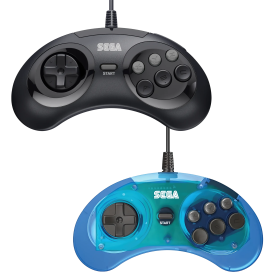
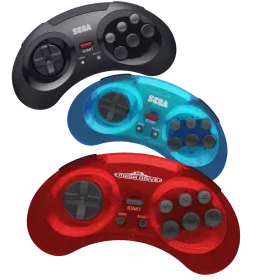
- Officially licensed SEGA 6-button controller with classic Mega Drive design
- 2.4 GHz wireless technology for lag-free gaming across all your devices
- Compatible with Mega Drive/Genesis, Mega Drive Mini, Switch, PS3, and PC/Mac
- Up to 30 hours battery life with automatic sleep mode for convenience
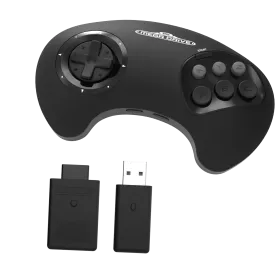
- Includes both Mega Drive and USB dongles plus premium carrying case
The wireless controller that brings authentic Mega Drive gaming to all your favorite platforms
Remember the satisfying click of the original SEGA Mega Drive controller? The Retro-Bit SEGA Mega Drive 6-button Pad brings back that iconic feel while adding modern wireless convenience. This officially licensed controller isn't just a nostalgic replica—it's a premium gaming tool designed for serious retro enthusiasts who demand both authenticity and versatility.
Authentic Design Meets Modern Technology
This controller faithfully recreates the classic 6-button layout that defined the golden age of 16-bit gaming. Whether you're executing complex fighting game combos or exploring platforming classics, you'll appreciate the responsive buttons and ergonomic design that made the Mega Drive controller legendary. The 2.4 GHz wireless connection delivers lag-free performance, so you can enjoy your games without the restrictions of cables while maintaining the precise input timing that retro games demand.
Ultimate Compatibility for Your Gaming Setup
What makes this controller truly special is its incredible versatility. It works seamlessly with original Mega Drive and Genesis consoles, the Mega Drive Mini, Nintendo Switch, PlayStation 3, and modern PCs and Macs. Two dongles are included—one for your original Mega Drive console and a USB dongle for everything else. This means you can use the same premium controller across your entire retro gaming collection without juggling multiple peripherals.
Built for Extended Gaming Sessions
With up to 30 hours of battery life on a single charge, you can game all weekend without interruption. The automatic sleep mode kicks in after 5 minutes of inactivity to conserve power, and charging is simple via the included Micro-USB cable. The controller even comes with a stylish protective case, making it perfect for taking to gaming meetups or storing safely when not in use.
Whether you're revisiting Streets of Rage, perfecting your skills in Street Fighter II, or discovering classic titles for the first time, the Retro-Bit SEGA Mega Drive 6-button Pad delivers the authentic experience you're looking for with the modern convenience you expect.
- System
- Android
Apple Macintosh
Nintendo Switch
PlayStation 3
Sega Mega Drive / Genesis
Sega Mega Drive Mini / Genesis Mini
Windows PC - Controller type
- Gamepad
- Brand compatibility
- Sega
Sony - Battery category
- Secondary, 1-50g
- WEEE registration number
- 23582226
- Battery weight (g)
- 20
- Battery capacity (mAh)
- 500
- Connection type
- 2.4 GHz wireless
- Number of analog sticks
- 0
- Controller layout
- 6-button retro gamepad
- Input modes (2.4 GHz)
- DInput
XInput - Input mode switching
- 2.4 GHz USB receiver: Start+B switches DInput (red LED) / XInput (blue LED) on PC. Mega Drive uses the separate 9-pin receiver. Micro-USB on V1 is charging only. Never mix V1/V2 firmware.
Practical answers about compatibility, features and how things work.
What input modes are available: XInput, DInput, Switch and PlayStation?
XInput is the best choice for most PC gamers. This widely supported input mode follows the Xbox controller layout and is recognized directly by many modern Windows games. For most users, that is all they need. However, XInput support does not automatically mean a controller works on a real Xbox console.
DInput (DirectInput) is the older Windows standard. Some older PC games, such as Crimson Skies or Need for Speed: Underground 2, support DirectInput but not native XInput.
An additional DInput or generic USB HID mode can also be useful for retro gaming systems, FPGA devices, emulators and other specialized setups. Some devices support Xbox-compatible controllers, while others expect a standard USB HID gamepad. Which input modes work depends on the specific device and its software.
For example, MiSTer FPGA supports many USB controllers as well as Xbox-compatible input devices. Depending on the core, different button mappings or special input features may be required. DInput itself is therefore not a general requirement on MiSTer.
If you plan to use your controller with retro or FPGA systems, check which input modes are supported beforehand. A controller with several selectable modes offers more flexibility.
Switch mode makes the controller appear to compatible devices as a Nintendo Switch Pro Controller. It can be useful beyond the Switch: Steam Input, Linux and various applications can also support these controllers. However, not every PC game will recognize this mode automatically.
PlayStation mode can refer to different compatibility modes depending on the controller, such as PS4 controller or PlayStation Classic modes. There is no single universal PlayStation mode. Compatibility with a particular PlayStation console must be explicitly confirmed for the product.
Connection type matters: Not every input mode is available over every connection. Some controllers support DInput only via a USB cable, while others also offer it through a 2.4 GHz receiver or Bluetooth.
That is why our technical specifications list confirmed input modes separately for USB, 2.4 GHz and Bluetooth.
What is the difference between 2.4 GHz wireless and Bluetooth controllers?
Both types of connection are wireless and use the 2.4 GHz frequency band. The difference is the transmission technology: Bluetooth is a widely used standard, whereas “2.4 GHz wireless” usually refers to a manufacturer's own radio link with a matching receiver.
Bluetooth: flexible and widely compatible
Many PCs, gaming handhelds, smartphones, tablets and consoles support Bluetooth controllers. If the controller is compatible with the device, you usually pair it once through the Bluetooth settings. After that, it will normally reconnect automatically.
No additional receiver is needed, leaving a USB port free.
However, not every Bluetooth-enabled device supports every Bluetooth controller. Game consoles in particular may require certain controller models or input modes.
2.4 GHz wireless: plug in and play
Controllers using 2.4 GHz wireless usually come with a matching USB receiver (dongle). Plug it in and switch the controller on. The two are often paired already.
This offers several advantages:
- No Bluetooth menu or Bluetooth manager setup is needed.
- It also works with compatible devices that have no built-in Bluetooth.
- Many systems recognize the receiver as a regular USB controller.
- That can be particularly useful for PCs, retro systems and other devices with USB ports.
The device must still support the particular receiver and its input mode. Not every dongle automatically works with every system. Some retro controllers also use dedicated receivers for particular consoles.
What about speed?
Many 2.4 GHz controllers offer high polling rates and low, consistent latency. Modern Bluetooth controllers can also be very fast, however. Actual performance depends on the specific controller and connection.
Which connection should I choose?
Bluetooth is especially useful if you want to use a controller with different compatible devices without carrying an extra receiver.
2.4 GHz wireless is often a good choice if you want a straightforward setup, prefer a responsive connection, or use a device without Bluetooth.
Check the product's technical specifications to see which connections and systems it supports.
What do polling rate and latency mean for a controller?
Polling rate and latency both affect how quickly a controller responds to your inputs, but they describe two different things.
What is polling rate?
Polling rate describes how often the controller or its connection reports or requests new input data from the system.
It is measured in hertz (Hz).
| Polling rate | Reporting interval |
|---|---|
| 125 Hz | 8 milliseconds |
| 250 Hz | 4 milliseconds |
| 500 Hz | 2 milliseconds |
| 1,000 Hz | 1 millisecond |
The higher the polling rate, the shorter the interval between input reports can be.
A high polling rate can therefore be useful in fast-paced games. The connected system must also support the relevant reporting rate.
What is latency?
Latency is the delay between an action on the controller and the moment the system registers that input.
Several factors contribute to this delay:
- How quickly the controller detects and processes the button press.
- How long transmission via cable, Bluetooth or 2.4 GHz wireless takes.
- How quickly the connected system processes the input.
Before the action becomes visible on the screen, the game and display introduce additional processing delays.
Does a 1,000 Hz polling rate automatically mean 1 ms of latency?
No. At 1,000 Hz, only the reporting interval is one millisecond. The total input delay can be considerably higher.
In practice, a well-optimized controller running at 500 Hz can therefore respond faster than a poorly optimized controller running at 1,000 Hz.
Which values matter?
For most games, consistently low latency matters more than the highest possible polling rate.
Low delays can be especially beneficial for fast action games, shooters and competitive games. In retro games, processing by emulators, consoles or FPGA systems and the display also matter.
Our tip: A high polling rate is an interesting technical specification, but does not by itself prove that a controller is fast. Measurements of real-world latency under comparable conditions are more meaningful.
Manufacturer
EU responsible person








SEGA Saturn 2.4GHz Pro Controller (Wireless)

Amiga CD32 Capacitor-Kit
Contains all electrolytic capacitors needed for a full recap of the Amiga CD32
High-end capacitor quality for lasting, reliable results
Fixes common issues like unstable performance, distorted picture, and audio problems
Extends the lifespan of your Amiga CD32 by many years
Ideal for retro gaming enthusiasts and DIY repair fans
Soldering required — perfect for hobbyists with basic electronics skills


Jaguar GameDrive
Flash cartridge that lets you run all Atari Jaguar games and homebrew from SD card
Full EEPROM save support with data stored directly on your SD card
Compatible with FAT16/FAT32 SD cards and all common ROM formats (JAG, J64, ROM, BIN, ABS)
Beautiful menu system with optional box art and screenshot previews via MRQ files
Works with all standard Atari Jaguar consoles (without Jaguar CD attachment)
Supports 128, 512, and 2048 byte EEPROMs for complete game compatibility


Wingman XE2 Converter (over 125 Controllers to PS3/4, Switch, PC)


R8sterblock
DIN A5 format with 50 sheets and glue binding
Unique 8x8 grid pattern perfect for 8-bit sprites and characters
Subdivisions in 2x2 and 4x4 make counting squares effortless
Ideal for game level maps, hex values, and dungeon layouts
Subtle lines that don't interfere with conventional drawing
Perfect tool for retro game developers and pixel artists

RetroHQ Mega Multi Adapter


PlayStation Coffee Mug
Official PlayStation merchandise featuring classic button symbols
Perfect 0.3 L capacity for coffee, tea, or any hot beverage
High-quality ceramic construction built for daily use
Ideal gift for PlayStation fans and collectors
Features the legendary triangle, circle, X, and square icons

GameBoy Soft PVC Keychain
Material: soft rubber / flexible plastic
Size: approx. 6 cm (total length with chain & ring approx. 12 cm)
Officially licensed Nintendo merchandise
Not suitable for children under 6 years (small parts)
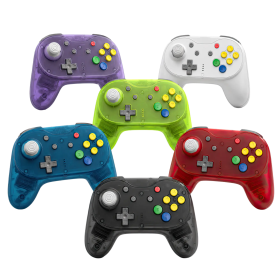

Brawler64 Pro
Hall Effect analog stick with 8-way notched gate – no drift, no wear
2.4GHz wireless + wired USB mode with 1000Hz polling rate
Programmable back buttons & adjustable rumble
Compatible with N64, Nintendo Switch, Switch 2, PC, Steam Deck & MiSTer FPGA
Magnetic faceplate system for instant color swaps
Includes: controller, N64 Retro Receiver, USB Receiver, braided USB-C cable, quick start manual
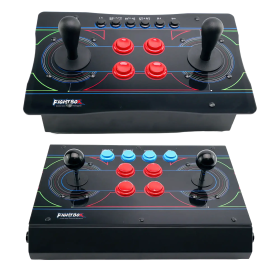

FightBox Twin Stick R10 (PC/PS3/PS4/NSW)
Two full-sized arcade joysticks for authentic twin-stick gameplay
Sanwa or HAPP sticks selectable (check product variant)
Metal case with transparent acrylic panel
GP2040-CE firmware on Raspberry Pi Pico – zero delay
Compatible with PC, PS3, PS4 & Nintendo Switch
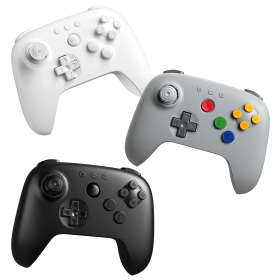
8BitDo 64 Bluetooth Controller (Analogue 3D, Switch, PC, Android)
Bluetooth for Nintendo Switch, Switch 2, Android & Windows
Hall Effect analog stick – no stick drift
Classic N64 button layout (A, B + 4 yellow C-buttons, L/R/Z)
Built-in rumble, button remapping & turbo function
Charges via USB-C

Retro-Bit SEGA Mega Drive 6-button Arcade Pad (Crimson Red, 9-Pin)
Official SEGA licensed arcade pad with classic 6-button layout
Compatible with all original Mega Drive and Genesis console models
Extended 3-meter cable for comfortable couch gaming
Original 9-pin connector for authentic retro experience
Premium build quality matching original controller standards
Perfect for classic fighting games and 16-bit titles

FightBox R3 Arcadestick (Sega Mega Drive)


Immortal Joystick v2 (DB9)
Robust diecast aluminium construction with premium Sanwa and Seimitsu arcade parts
Detachable braided cable for easy replacement and maintenance
Autofire function and switchable second button for jump functionality
Available in left-handed (arcade style) or right-handed (home computer style) layouts
Compatible with Amiga, C64, Atari, ZX Spectrum, Sega Master System and more
Customizable with standard arcade parts – swap buttons and ball tops to your preference

D6 Dreamcast Controller (Dreamcast / Switch / PC)

BattlerGC Pro Wireless Controller (GameCube)
Dual wireless: 2.4 GHz & Bluetooth for GameCube, Wii, Switch & PC
Hall Effect sensors eliminate stick drift forever
Premium Kailh® switches and authentic GC-style analog triggers
10+ hours battery life with wireless vibration feedback
Ergonomic design with dual Z buttons and programmable back buttons

Origin8 Wireless Controller (NES, Switch, USB)
Authentic NES-inspired design with modern enhancements including ZL/ZR shoulder buttons, Home and Screenshot functionality
True wireless freedom via 2.4GHz connection - compatible with original NES consoles, Nintendo Switch (NSO library), and USB-enabled devices
Built-in turbo switches for A and B buttons deliver rapid-fire action through your favorite classic games
500mAh rechargeable battery with USB-C fast charging keeps you gaming longer
Complete package includes controller, USB wireless receiver, NES wireless receiver, and 1m USB-C charging cable
Retro-Bit SEGA MegaDrive BIG6 2.4GHz Wireless controller (Black)
Officially SEGA-licensed BIG6 controller in iconic large Mega Drive style
2.4 GHz wireless technology for lag-free gaming on Mega Drive/Genesis and PC
6 action buttons plus shoulder button in the beloved original controller size
Improved D-pad and repositioned START button for enhanced comfort
Includes both Mega Drive/Genesis receiver and USB dongle for versatile use
Additional Home and Select buttons perfect for modern PC gaming
SEGA Saturn 2.4GHz Pro Controller (Wireless)

BattlerGC Wireless Controller (GameCube, Switch, PC)
Retro-Bit SEGA Mega Drive 6-button Arcade Pad (Crimson Red, 9-Pin)
Official SEGA licensed arcade pad with classic 6-button layout
Compatible with all original Mega Drive and Genesis console models
Extended 3-meter cable for comfortable couch gaming
Original 9-pin connector for authentic retro experience
Premium build quality matching original controller standards
Perfect for classic fighting games and 16-bit titles

River City Fighting Legend (NES)

River City Basketball (NES)

River City Ball & Brawl Bundle (NES)

Undeadline Collector's Edition (MegaDrive / Genesis)

R.C. Pro-Am II (NES)

P-47 II MD Collector's Edition (MegaDrive / Genesis)
Origin8 Wireless Controller (NES, Switch, USB)
Authentic NES-inspired design with modern enhancements including ZL/ZR shoulder buttons, Home and Screenshot functionality
True wireless freedom via 2.4GHz connection - compatible with original NES consoles, Nintendo Switch (NSO library), and USB-enabled devices
Built-in turbo switches for A and B buttons deliver rapid-fire action through your favorite classic games
500mAh rechargeable battery with USB-C fast charging keeps you gaming longer
Complete package includes controller, USB wireless receiver, NES wireless receiver, and 1m USB-C charging cable

Toaplan Shooters Collector's Edition - Volume 2 (MegaDrive / Genesis)
Retro-Bit SEGA MegaDrive BIG6 2.4GHz Wireless controller (Black)
Officially SEGA-licensed BIG6 controller in iconic large Mega Drive style
2.4 GHz wireless technology for lag-free gaming on Mega Drive/Genesis and PC
6 action buttons plus shoulder button in the beloved original controller size
Improved D-pad and repositioned START button for enhanced comfort
Includes both Mega Drive/Genesis receiver and USB dongle for versatile use
Additional Home and Select buttons perfect for modern PC gaming