
List of products by brand GPD

GPD develops compact Windows handhelds and UMPCs for gaming, work and mobile specialist applications.

There are 37 products.

NewOut-of-Stock
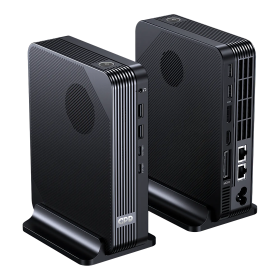
GPD BOX Mini PC (Intel Core Ultra X7 358H / Core Ultra 7 356H)
Out-of-Stock
The GPD BOX brings Intel Panther Lake performance and flexible expansion to a compact desktop PC.

Choose powerful Arc B390 graphics or MCIO 8i expansion
Use compatible USB4 external GPU docks
Compact metal chassis with built-in power supply
MCIO is exclusive to the 356H version
From €1,650.00
GPD Duo Replacement Battery
Last items in stock
Original replacement battery (model 6548A0) for the GPD Duo – sourced directly from the OEM manufacturer, not a cheap knockoff. Important: The 6548A0 designation also exists for the GPD Win 5, but the two batteries are physically incompatible – only install this one in a GPD Duo.Fits the GPD Duo perfectly and communicates correctly with the device's charge controller.Supports fast charging at up to 100 W (PD 3.0) – just like the original factory battery.At 80 Wh capacity, you'll get your GPD Duo back to full endurance.Warning: Not compatible with the GPD Win 5, despite sharing the same 6548A0 model number.
€89.00
NewOut-of-Stock
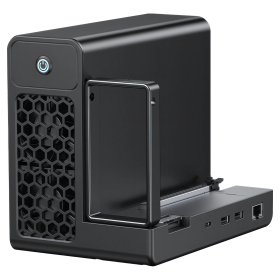
GPD G2 eGPU Dock (without GPU)
Out-of-Stock
The GPD G2 turns a compatible mini PC or gaming handheld into a flexible external desktop GPU setup with extra connectivity.

MCIO 8i and USB4 v2.0 expansion
Built-in 800W Gold-rated power supply
Additional USB, Ethernet and M.2 storage
Graphics card not included
€379.00
GPD MicroPC 2 - Official Carry Case
In Stock
The official carrying case for the GPD Micro PC 2 – hard EVA shell, perfect fit, and a distinctive Micro PC 2 imprint.

Hard EVA shell: rigid, shock-absorbing protection
Precision fit for the GPD Micro PC 2 (device only, no charger included)
Official Micro PC 2 imprint on the case
Soft interior lining prevents scratches
All-around zipper for secure closure
€19.00
GPD MicroPC2 (Intel N300, 16GB RAM, 7" LCD)
Out-of-Stock
The new GPD MicroPC2 from GPD is a professional mini PC with Windows 11 for your pocket. Specially developed for productive use.

7" Full HD (1920×1080) Touchscreen with 180° hinge
Intel Alder Lake-N CPU for efficient mobile performance
16 GB LPDDR5 RAM and fast M.2 NVMe SSD (upgradeable)
Ships with Windows 11 for full desktop productivity
Extensive ports: USB-C, USB-A, HDMI 2.1, 2.5GbE, microSD
Wi-Fi 6, Bluetooth 5.x and fingerprint reader
Rugged, ultra-portable design at approx. 490 g
From €819.00
GPD Pocket 3 / 4 - Official Carry Case
In Stock
The official GPD Pocket 4 Protective Case in premium faux leather keeps your mini laptop safe and within reach – whether in a backpack, briefcase, or on the road.

Official GPD accessory, tailored for GPD Pocket 4 (also compatible with Pocket 3)
Faux leather exterior with soft inner lining
Magnetic closure for quick and secure access
Stylus pocket included (note: GPD stylus is too long to close case fully)
Slim, lightweight design – no unnecessary bulk
€19.00
GPD Pocket 4
Out-of-Stock
The GPD Pocket 4 UMPC with 8.8 inch display and the latest AMD AI 9 processor. Ships directly from Germany, no more costs if you are living within the EU!
From €1,299.00
GPD Pocket 4 LTE Module
Out-of-Stock
The LTE module adds mobile Internet access to the GPD Pocket 4 using a nano-SIM card.

Direct expansion module for the GPD Pocket 4
Installs on the rear of the device
Requires a nano-SIM card
Network availability and compatibility depend on carrier and region
€75.00
GPD Pocket 4 RS-232 Module
In Stock
The RS-232 module adds a physical native serial port with proper level conversion to the GPD Pocket 4.Native RS-232 interface with level shifterNot a USB-to-serial adapterFor legacy industrial, service and control hardwareDirect expansion module for the GPD Pocket 4
€17.00
GPD Pocket Protection Pouch (Imitation Leather) , Brown
Last items in stock
Protect your GPD Pocket in style with this official brown imitation leather pouch designed for ultimate portability and classic appeal.Official GPD accessory crafted specifically for the original GPD PocketPremium brown imitation leather exterior for timeless, sophisticated styleSoft interior lining prevents scratches and protects against daily wearSlim, lightweight design fits easily into bags without adding bulkSnug fit keeps your handheld secure during travel and commutesImportant: NOT compatible with GPD Pocket 2 or other models
€14.00

Our range includes devices from the Win, Pocket, MicroPC and Duo families, plus matching docks, modules, cases and many replacement parts.

Models differ substantially in size, processor, connections, keyboard and display. Accessories and parts often fit only a particular model year, so the exact compatibility is listed with each product.

DRAGONBOX KNOW-HOW

Frequently asked questions

Practical answers about compatibility, features and how things work.

Are GPD handhelds regular PCs, and can I install Windows, Linux or another operating system?

Yes! GPD WIN, Pocket and MicroPC devices, as well as the GPD BOX, are full PCs powered by AMD or Intel processors. They are not closed game consoles: you can install normal PC software, manage storage and install another suitable operating system.

Windows is preinstalled on many models, but you can also use an x86-64-compatible Linux distribution such as Ubuntu or Fedora. For gaming handhelds, customized Linux systems such as Bazzite are also worth considering. Other PC operating systems are possible in principle if they can boot and support the hardware. You are not locked into Windows.

Important: Being able to install an OS does not guarantee full driver support. Touchscreens, gamepads, fingerprint readers, display rotation, sleep modes, fan control, special keys and external GPUs may require adjustments or may not work fully. Software and game compatibility also varies by OS.

You can replace Windows or set up dual boot on suitable devices. Back up your files and recovery media first. Official Windows recovery images, BIOS updates and drivers are available from the GPD download center. Check the alternative OS project's current device compatibility before installing.

How do I reinstall Windows, and where can I find GPD drivers and BIOS updates?

Just like on a regular PC, you can reinstall Windows on your GPD device. There are two common options:

  • Microsoft Windows installation: Install Windows from a USB installer, then add the device-specific drivers.
  • GPD recovery image: Use the image specifically intended for your exact model and generation from the official GPD download center. It often already includes the appropriate manufacturer drivers.

After a clean Windows installation, drivers for wireless networking, graphics, touchscreen, audio, gamepad and other special functions may initially be missing. Download the correct driver package before reinstalling whenever possible.

BIOS updates are not ordinary Windows updates. Only use files intended for your exact hardware revision. A failed or interrupted BIOS update can prevent the PC from booting. Keep the power adapter connected and preferably update BIOS or device firmware only if there is a specific reason.

Important: Reinstallation and recovery may erase personal files, games and settings. Back up your data and recovery information first.

What does TDP mean on a GPD PC, and how does it affect performance, noise and battery life?

TDP is an important processor power and thermal design rating. On many GPD devices, the processor power budget can be adjusted through supported settings or software.

More power can improve performance in demanding games and applications, but it usually means more heat, fan noise and energy consumption. Performance does not increase proportionally with wattage: eventually cooling, temperature or other components become the limiting factor.

Less power can be a better choice for older games, emulation or office work, making the device cooler, quieter and often extending battery life.

A useful approach is to choose a sensible frame-rate limit first, then increase the power budget only as much as needed for smooth play. GPD provides control tools for certain models; the GPDTool overview explains performance profiles and fan controls.

Important: Allowed power limits and adjustment methods vary by model. Do not exceed the manufacturer's supported limits. A higher TDP does not automatically make a device faster or better.

Can I run normal PC games, Steam, GOG, Game Pass and emulators on a GPD handheld?

Yes. A GPD WIN handheld is a normal gaming PC in a small form factor. On Windows, you can use the same PC games, software and stores as on a desktop or laptop, including Steam, GOG, Epic Games Store and the Xbox app. Actual game performance depends on the title's requirements and your GPD configuration.

You can also install emulators just as you would on any other PC. Many classic systems work well with modest settings. You need to supply any legally required game files and BIOS files yourself from authorized sources.

On Linux, many PC games work through Steam and, where appropriate, Proton. Not every Windows game is compatible, however: anti-cheat, DRM and some launchers may cause problems. The Windows PC Game Pass experience is not directly transferable to Linux; cloud gaming may be an alternative.

The key difference from a closed console: You are not limited to one store or a fixed game library. On the other hand, you may need to configure games, controls and graphics options just as on any other PC.

What is the difference between USB4, Thunderbolt, OCuLink and MCIO for external graphics on GPD devices?

An external GPU (eGPU) can add graphics performance to a compact PC. Which connection works depends on the actual ports on both the GPD computer and the graphics dock.

  • USB4 / Thunderbolt: Carries PCIe traffic through a compatible USB-C port. This flexible connection can also support displays and docking features. Not every USB-C port supports USB4 or eGPUs. Available bandwidth depends on the specific port generation and device.
  • OCuLink: A more direct PCIe connection, for example PCIe 4.0 ×4. With suitable hardware it often has less protocol overhead than USB4, but does not provide general-purpose USB docking. OCuLink is generally not intended to be connected or disconnected while the system is running; power devices down first.
  • MCIO 8i: A newer connector for higher-bandwidth PCIe devices. It is used by the GPD G2 and GPD BOX, among others. It is not interchangeable with an OCuLink plug; the correct port and cable are required.

The GPD G1 already contains a Radeon GPU and offers OCuLink and USB4. The GPD G2 is an eGPU enclosure/dock without a graphics card included, featuring USB4 v2.0 and MCIO 8i.

Before buying: Check your exact GPD model generation, ports, cables, power supply, graphics card and drivers. A physically matching USB-C connector alone does not guarantee eGPU compatibility.

Can I upgrade the SSD and RAM in a GPD PC?

That depends on the exact GPD model. Many devices use replaceable M.2 NVMe SSDs, allowing storage upgrades when the drive's size and interface are compatible. Not every M.2 slot supports the same form factor, speed or purpose; in particular, 2230 and 2280 are different sizes.

RAM is different: many compact GPD gaming handhelds use LPDDR memory soldered directly to the motherboard, which cannot be upgraded like ordinary RAM modules. Other GPD PCs may be built differently, so always check your product's actual specifications.

Before replacing an SSD: Back up personal files and game saves, consider preparing recovery media, and have the necessary Windows or Linux drivers ready. Replacing the system drive requires restoring or reinstalling the operating system afterward.

Important: Not every physically fitting SSD is suitable. Check drive thickness, heat, power requirements, form factor and the manufacturer's instructions. Opening the device and replacing components carries a risk of damage; professional installation may be advisable.

Which power adapter does my GPD PC need, and why doesn't every USB-C charger work?

USB-C only describes the connector; it does not guarantee a suitable power supply. The supported charging protocol, voltage and power output are what matter.

Many compact GPD PCs charge via USB-C Power Delivery (PD). The charger must provide the required PD voltage and enough watts, and higher power levels may also require a suitable cable. A phone charger may have the same USB-C connector yet be completely unsuitable for a demanding handheld PC.

Under heavy load, a gaming PC can consume more energy than a weak charger provides. As a result, the battery may charge very slowly, discharge while plugged in, or performance may be limited.

New high-performance models need special attention: The GPD WIN 5 uses a dedicated 180 W DC adapter and an external battery. According to GPD, the WIN Max 3 also supports USB-C PD up to 100 W alongside its 180 W adapter, which may impose limits at very high power settings. Power requirements vary by device.

Prefer the included adapter or a verified compatible replacement with the exact required specifications. Do not confuse USB-C data ports with charging ports.

Do GPD devices have a German keyboard, and can I select QWERTZ in Windows or Linux?

The operating-system language and physical keyboard labels are different things. On a GPD PC you can use Windows or Linux in German and select the German QWERTZ keyboard layout in system settings.

Many GPD devices, however, ship with a physically English-labeled QWERTY keyboard. Selecting the German layout changes the characters produced by the keys, but not the printed letters. For example, the Y and Z labels remain as printed.

Whether a German physical keyboard, official replacement or suitable spare parts are available depends on the specific model. Replacement keyboards exist for some older devices, including the WIN Max 2. We do not offer a German physical keyboard layout for the GPD WIN Max 3, although you can of course still select German in software.

Before purchasing: Check the keyboard variant stated in the technical specifications or product description, not just the language selected in Windows.

What is the difference between GPD G1 and GPD G2? Is a graphics card included?

The names are similar, but the two products use different concepts.

  • GPD G1: A compact ready-to-use eGPU dock with a built-in AMD Radeon RX 7600M XT and 8 GB of graphics memory. A compatible GPD PC can use it through USB4 or OCuLink. The graphics card is already included.
  • GPD G2: An eGPU enclosure with no graphics card included. You must supply a suitable desktop GPU separately. The G2 has a PCIe slot and offers USB4 v2.0 and MCIO 8i for compatible hosts. It is not simply a newer dock with a GPU already fitted.

Connection warning: G1s OCuLink and G2s MCIO 8i are not interchangeable. eGPUs can also operate through a suitable USB4/Thunderbolt connection without those special ports, provided both devices support it.

For the G2, check the graphics cards physical size, power connectors, power draw and drivers, as well as your GPD PCs operating system and connectivity.

Official specifications: GPD G1 technical specifications and GPD G2 technical specifications.