

8BitDo

8BitDo combines classic controller shapes with modern wireless connections, Hall sticks and current features. This section includes gamepads, Retro Receivers, USB adapters and selected input devices from the brand.

Check the platform, connection and button layout before choosing. Some controllers work with several devices, while others require a matching receiver or differ in their supported special functions.

Controller buying guide
Which controller is right for you?

Find a suitable controller for your systems, connections and input modes. USB, Bluetooth and 2.4 GHz are evaluated separately.

There are 48 products.

Retro Receiver NES
In Stock
Transform your original NES into a wireless gaming powerhouse with the 8BitDo Retro Receiver – the sleek Bluetooth adapter that brings modern controller convenience to your classic console.

Enables wireless gameplay on your original NES using modern Bluetooth controllers
Compatible with 8BitDo, PS3, PS4, Wii Remote and Wii U Pro controllers
No external power supply needed – powered directly through the NES controller port
Supports two-player multiplayer with two receivers and controllers
Doubles as a Bluetooth receiver for your PC via USB connection
Seamlessly fits into original NES controller ports for a clean, authentic look
€19.00
Retro Receiver NES / SNES Classic
In Stock
Transform your NES or SNES Classic Mini into a wireless gaming powerhouse with this versatile Bluetooth receiver.Connect PS3, PS4, Wii Remote, Wii U Pro and 8BitDo controllers wirelesslyEliminates those frustratingly short original controller cablesFits perfectly into original NES/SNES Classic controller portsNo external power needed - draws power directly from the consoleSupports multiplayer gaming with two receiversDouble duty as a Bluetooth dongle for your PC
€15.00
Retro Receiver MegaDrive / Genesis
In Stock
Transform your Sega Mega Drive or Genesis into a wireless gaming powerhouse with this ingenious Bluetooth receiver from 8BitDo.

Plugs directly into the original 9-pin controller port – no external power needed
Compatible with 8BitDo, PS3, PS4, Wii Remote and Wii U Pro controllers
Supports multiplayer gaming when using two receivers simultaneously
Doubles as a USB Bluetooth adapter for your PC
Simple setup with stable wireless connection for lag-free retro gaming
€18.00
8BitDo Zero 2 Mini Bluetooth Controller (Switch, PC, macOS, Android)
Last items in stock
The 8BitDo Zero 2 is a pocket-sized Bluetooth controller that packs serious gaming power into a tiny 20g package.

Ultra-portable mini gamepad that fits on your keychain
Compatible with Nintendo Switch, Windows, Android, macOS and more
Multiple modes: X-Input, D-Input, Switch and Keyboard
Up to 8 hours of battery life despite its tiny size
Firmware upgradeable via USB for future improvements
Perfect for retro gaming on the go
From €19.00
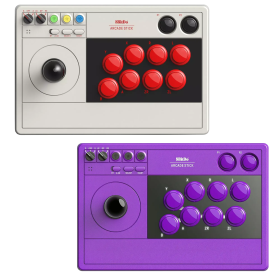
8BitDo Arcade Stick (Switch, PC, Android, Raspberry Pi)
Last items in stock
The 8BitDo 80FE Arcade Stick combines wireless freedom with serious modding potential for retro and modern gaming enthusiasts.

Connect via Bluetooth, 2.4GHz wireless, or USB-C cable
Compatible with PC, Nintendo Switch, Android, and Raspberry Pi
Ultra-moddable design supports Sanwa, Seimitsu, Happy & IL parts
40-hour battery life with 1000mAh rechargeable battery
Customizable button mapping with macro support
Quick-toggle switch between D-pad, left stick, and right stick modes
From €79.00
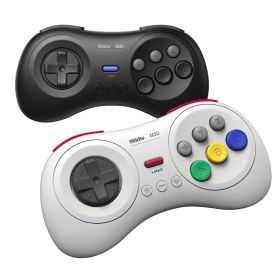
8BitDo M30 2.4G White (MegaDrive Mini, Switch, PC)
Last items in stock
Experience the classic 6-button layout of the Sega Genesis era with this wireless controller that works flawlessly with your MegaDrive Mini, Nintendo Switch, and PC.Authentic 6-button Genesis/MegaDrive controller layout2.4GHz wireless connection with included USB receiverCompatible with Sega MegaDrive Mini, Nintendo Switch, and Windows PCLag-free gaming experience for retro and modern titlesComfortable ergonomic design in classic white finishRechargeable battery for hours of wireless gameplay
€29.00
8BitDo SN30 Pro Bluetooth Hall Gamepad (Switch, PC, macOS, Android)
Last items in stock
The 8BitDo SN30 Pro combines classic SNES design with modern gaming technology, featuring Hall Effect analog sticks for ultimate precision.

Premium Hall Effect sticks for drift-free accuracy
Classic SNES-inspired design with full modern controls
Multi-platform compatibility: Windows, Switch, Android & more
Wireless Bluetooth or wired USB-C connection
Built-in rumble and motion controls
Rechargeable battery with USB-C charging
From €39.00
€42.00
8BitDo M30 Bluetooth Gamepad (Switch, PC)
Last items in stock
The 8BitDo M30 Bluetooth controller brings classic Sega Genesis vibes to your modern gaming setup with wireless freedom and incredible compatibility.

Authentic 6-button layout inspired by the iconic Sega Genesis controller
Wireless Bluetooth connectivity for PC, Mac, Android, Nintendo Switch and more
Works with original consoles via 8BitDo Retro Receiver (sold separately)
Rechargeable battery for extended wireless gaming sessions
X-input and D-input support plus wired USB mode included
Regular firmware updates add new system compatibility
From €24.90
8Bitdo Wireless USB Adapter 2
In Stock
The 8Bitdo Wireless USB Adapter 2 lets you use virtually any Bluetooth controller on your PC, Mac, Nintendo Switch, Android devices, and more!Compatible with Xbox, PlayStation, Switch, Wii, and 8Bitdo controllersWorks with Switch, Windows, macOS, Linux, Android, Raspberry Pi, and Steam DeckPlug-and-play - no drivers needed, appears as standard joystickFull vibration support and 6-axis motion on SwitchRemap buttons and add macros with 8Bitdo Ultimate SoftwareLag-free wireless performance with upgradable firmware
From €19.00
8BitDo SN30 Pro USB Gamepad (PC, macOS, Linux)
Last items in stock
Experience retro gaming perfection with the 8BitDo SN30 Pro USB Gamepad – a modern classic that brings SNES nostalgia to your PC gaming setup.Classic SNES design meets modern gamepad functionalityPremium D-Pad perfect for retro games and precision platformingDual analog sticks, four shoulder buttons, and full rumble supportPlug-and-play USB connection for Windows PCProfessional-grade build quality from the trusted 8BitDo brandIncludes USB cable for instant gaming action
From €25.00
8BitDo Pro 2 Hall Edition (Switch, PC, macOS, Android)
Last items in stock
The 8Bitdo Pro 2 Hall Edition combines classic SNES design with modern features like hall effect sticks, dual back paddles, and wireless connectivity for up to 20 hours of gaming.

Hall effect analog sticks for enhanced precision and durability
Connect wirelessly via Bluetooth 4.0 or wired with USB-C cable
Two programmable back paddle buttons for competitive advantage
6-axis motion sensor and customizable vibration feedback
Store up to 3 custom profiles, switch on-the-fly
Compatible with Windows PC, Switch, macOS, Linux and more
From €44.50
8BitDo Ultimate 2C 2.4G Controller (PC, Android)
Last items in stock
The 8BitDo Ultimate 2C is an excellent wireless controller that delivers premium performance without the premium price tag.

Hall effect sticks and triggers for superior precision and durability
Works with Windows PC and Android via 2.4GHz, Bluetooth, or USB cable
Impressive 1000Hz polling rate when using the included 2.4G dongle
Six shoulder buttons (L1/R1, L2/R2, L4/R4) for extra flexibility
Up to 32 hours battery life via Bluetooth, 25 hours via 2.4GHz
Fully customizable button mapping through dedicated software
From €29.00
DRAGONBOX KNOW-HOW

Frequently asked questions

Practical answers about compatibility, features and how things work.

What input modes are available: XInput, DInput, Switch and PlayStation?

XInput is the best choice for most PC gamers. This widely supported input mode follows the Xbox controller layout and is recognized directly by many modern Windows games. For most users, that is all they need. However, XInput support does not automatically mean a controller works on a real Xbox console.

DInput (DirectInput) is the older Windows standard. Some older PC games, such as Crimson Skies or Need for Speed: Underground 2, support DirectInput but not native XInput.

An additional DInput or generic USB HID mode can also be useful for retro gaming systems, FPGA devices, emulators and other specialized setups. Some devices support Xbox-compatible controllers, while others expect a standard USB HID gamepad. Which input modes work depends on the specific device and its software.

For example, MiSTer FPGA supports many USB controllers as well as Xbox-compatible input devices. Depending on the core, different button mappings or special input features may be required. DInput itself is therefore not a general requirement on MiSTer.

If you plan to use your controller with retro or FPGA systems, check which input modes are supported beforehand. A controller with several selectable modes offers more flexibility.

Switch mode makes the controller appear to compatible devices as a Nintendo Switch Pro Controller. It can be useful beyond the Switch: Steam Input, Linux and various applications can also support these controllers. However, not every PC game will recognize this mode automatically.

PlayStation mode can refer to different compatibility modes depending on the controller, such as PS4 controller or PlayStation Classic modes. There is no single universal PlayStation mode. Compatibility with a particular PlayStation console must be explicitly confirmed for the product.

Connection type matters: Not every input mode is available over every connection. Some controllers support DInput only via a USB cable, while others also offer it through a 2.4 GHz receiver or Bluetooth.

That is why our technical specifications list confirmed input modes separately for USB, 2.4 GHz and Bluetooth.

What is the difference between 2.4 GHz wireless and Bluetooth controllers?

Both types of connection are wireless and use the 2.4 GHz frequency band. The difference is the transmission technology: Bluetooth is a widely used standard, whereas “2.4 GHz wireless” usually refers to a manufacturer's own radio link with a matching receiver.

Bluetooth: flexible and widely compatible

Many PCs, gaming handhelds, smartphones, tablets and consoles support Bluetooth controllers. If the controller is compatible with the device, you usually pair it once through the Bluetooth settings. After that, it will normally reconnect automatically.

No additional receiver is needed, leaving a USB port free.

However, not every Bluetooth-enabled device supports every Bluetooth controller. Game consoles in particular may require certain controller models or input modes.

2.4 GHz wireless: plug in and play

Controllers using 2.4 GHz wireless usually come with a matching USB receiver (dongle). Plug it in and switch the controller on. The two are often paired already.

This offers several advantages:

  • No Bluetooth menu or Bluetooth manager setup is needed.
  • It also works with compatible devices that have no built-in Bluetooth.
  • Many systems recognize the receiver as a regular USB controller.
  • That can be particularly useful for PCs, retro systems and other devices with USB ports.

The device must still support the particular receiver and its input mode. Not every dongle automatically works with every system. Some retro controllers also use dedicated receivers for particular consoles.

What about speed?

Many 2.4 GHz controllers offer high polling rates and low, consistent latency. Modern Bluetooth controllers can also be very fast, however. Actual performance depends on the specific controller and connection.

Which connection should I choose?

Bluetooth is especially useful if you want to use a controller with different compatible devices without carrying an extra receiver.

2.4 GHz wireless is often a good choice if you want a straightforward setup, prefer a responsive connection, or use a device without Bluetooth.

Check the product's technical specifications to see which connections and systems it supports.

What do polling rate and latency mean for a controller?

Polling rate and latency both affect how quickly a controller responds to your inputs, but they describe two different things.

What is polling rate?

Polling rate describes how often the controller or its connection reports or requests new input data from the system.

It is measured in hertz (Hz).

Polling rateReporting interval
125 Hz8 milliseconds
250 Hz4 milliseconds
500 Hz2 milliseconds
1,000 Hz1 millisecond

The higher the polling rate, the shorter the interval between input reports can be.

A high polling rate can therefore be useful in fast-paced games. The connected system must also support the relevant reporting rate.

What is latency?

Latency is the delay between an action on the controller and the moment the system registers that input.

Several factors contribute to this delay:

  • How quickly the controller detects and processes the button press.
  • How long transmission via cable, Bluetooth or 2.4 GHz wireless takes.
  • How quickly the connected system processes the input.

Before the action becomes visible on the screen, the game and display introduce additional processing delays.

Does a 1,000 Hz polling rate automatically mean 1 ms of latency?

No. At 1,000 Hz, only the reporting interval is one millisecond. The total input delay can be considerably higher.

In practice, a well-optimized controller running at 500 Hz can therefore respond faster than a poorly optimized controller running at 1,000 Hz.

Which values matter?

For most games, consistently low latency matters more than the highest possible polling rate.

Low delays can be especially beneficial for fast action games, shooters and competitive games. In retro games, processing by emulators, consoles or FPGA systems and the display also matter.

Our tip: A high polling rate is an interesting technical specification, but does not by itself prove that a controller is fast. Measurements of real-world latency under comparable conditions are more meaningful.

What is the difference between 8BitDo Pro and Ultimate controllers?

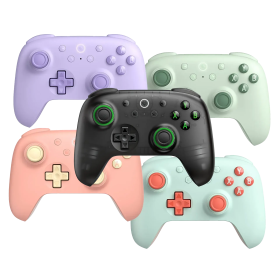
At 8BitDo, “Ultimate” does not automatically mean “better” than “Pro”. The main difference between the two series is their shape and the arrangement of the D-pad and analog sticks.

Pro series: Inspired by classic SNES and PlayStation controllers. The D-pad sits at the upper left, with the left analog stick below it. The two analog sticks are symmetrically positioned. This layout appeals to fans of classic controllers and players who often use the D-pad.

Ultimate series: Inspired by modern Xbox and Nintendo Switch Pro controllers. Here the positions are reversed: the left analog stick is at the upper left, with the D-pad below it. The analog sticks are offset.

Important: The series name does not tell you which controller has more features or better technology. Connectivity, supported platforms, stick technology, triggers and extra features vary by model. Choose based on your preferred layout and the individual controller's specifications.

Can I remap controller buttons or use macros and turbo functions?

That depends on the controller. Remapping, macros and turbo are different features. Not every controller supports all of them, and some settings are available only through specific software, connection types or input modes.

  • Remapping: One button takes over the function of another, such as swapping A and B. Depending on the model, button mappings can be changed on the controller or in an app, sometimes with saved profiles.
  • Macros: A single press triggers several inputs at once or in a sequence. Support for button sequences, timing and custom combinations varies by controller. Remappable buttons do not automatically mean macro support.
  • Turbo: A button sends repeated presses without the player having to press it over and over. Some controllers repeat only while the button is held; others also offer continuous automatic repetition.
  • Keyboard input: Some controllers or configuration apps can map controller buttons to keyboard commands. This is useful for PC games with functions that are accessible only through keyboard keys. Keyboard mapping is not an inherent feature of macros.

Important: Extra buttons do not necessarily support programmable macros. Some can only duplicate existing controller buttons. Software availability, profiles and stored settings also vary by model and platform.

Check the technical specifications and, where available, the FAQs on the individual product page for functions confirmed for that particular controller. Online games may also have their own rules regarding macros or turbo functions.

Why does my controller work on a PC but not necessarily on Xbox or PlayStation?

A controller that works on Windows is not automatically compatible with an Xbox or PlayStation console. PC input modes and compatibility with a real console are two different things.

XInput is a widely supported Windows game input standard based on Xbox-style controllers. A gamepad may operate as an XInput device on a PC without being recognized as an authorized controller by a physical Xbox console. DInput or generic USB gamepad support does not guarantee console compatibility either.

Xbox and PlayStation: Supported controllers depend on the console generation, the connection protocol and the devices accepted or authorized by the system. Compatibility with an older console does not automatically extend to the next generation or to every game.

Adapters and receivers: Some controllers require a receiver or adapter specifically intended for the target console. An ordinary Bluetooth or 2.4 GHz USB receiver designed for PCs will not necessarily work on consoles. The available input modes may also differ between USB, Bluetooth and 2.4 GHz connections.

Nintendo Switch and Steam: A Switch- or Steam-compatible input mode does not itself establish Xbox or PlayStation support. Likewise, PC software may recognize controllers that a particular console game cannot use directly.

What matters is the explicitly confirmed platform support of the specific controller. Check the compatibility list and technical specifications on its product page rather than relying on labels such as “XInput”, “Bluetooth” or “for PC”. If a console is not listed, do not assume that it is supported.